
Purpose
SureLock allows administrators to integrate SureFox as a plugin, enabling secure and restricted web browsing directly from the SureLock environment. This feature is especially useful when devices must offer controlled web access without exposing users to unauthorized websites or system settings. By enabling the SureFox plugin, organizations can provide a safe, kiosk-like browsing experience while maintaining full device lockdown.
The purpose of this article is to guide users through the process of enabling the SureFox plugin within SureLock. This includes locating the plugin settings, activating SureFox as an approved plugin application, and ensuring the browsing environment is properly controlled through SureLock.
Prerequisites
- SureLock version 22.53.05 or later , integrated SureLock v28.53.05
- Admin access to SureLock settings.
Steps
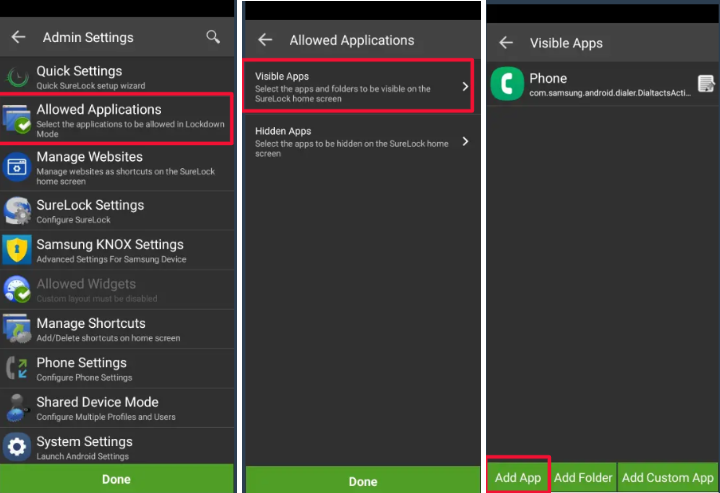
- Access SureLock Admin Settings.
- On the Allowed Applications screen, tap Visible Apps and then tap Add App to launch the list of installed applications.
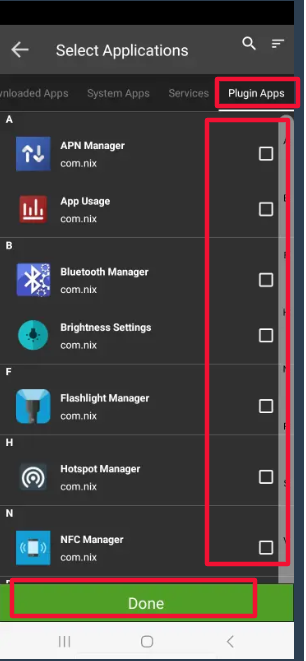
- Navigate to the Plugin Apps section.
- Select the SureFox Plugin
- Save and click on Done.
Conclusion:
Enabling the built-in SureFox plugin within SureLock allows administrators to offer controlled and secure web browsing without installing SureFox separately. This streamlined integration enhances security, simplifies deployment, and ensures users have access only to approved web content within a fully managed environment.
Need help?
CONTACT US