
Purpose
In large device deployments, it is often challenging for administrators to stay updated about the communication activities of enrolled devices without constantly monitoring the SureMDM console. Having an automated notification system ensures that admins are promptly informed whenever a managed device sends a message or update to the console.
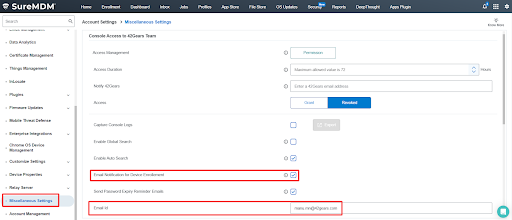
To address this, SureMDM offers an option under Account Settings → Miscellaneous Settings called Email Notification for Device Enrollment. When enabled, the registered email ID receives a notification whenever an enrolled device sends a message to the SureMDM console. This feature helps improve visibility, responsiveness, and overall efficiency in device management.
Prerequisites
- Admin access to the SureMDM console.
- A valid email address to receive the notification.
Steps
- Log in to the SureMDM Web Console.
- Navigate to Account Settings → Miscellaneous Settings.
- Under Miscellaneous Settings, scroll down to find the Email Notification for Device Enrollment option.
- Check the box next to Email Notification for Device Enrollment.
- In the Email ID field, enter the email address that should receive the notification.
- Click Apply to Save the changes.
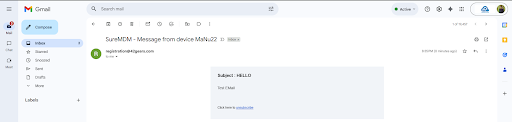
- Once enabled, whenever an Enrolled device sends a message to the SureMDM console, a notification email will be sent to the registered Email address.
Expected Results
- The Registered email ID receives a notification email whenever a managed device sends a message to the SureMDM console.
Conclusion
By enabling Email Notification for Device Enrollment, administrators can efficiently monitor device communication and stay informed in real-time without manually checking the console.
Need help?
CONTACT US