
Purpose
The purpose of this knowledge article is to provide a guide on how to change the positioning of Toast Message for Jobs/Profiles when saved on console.
Prerequisites
Subscription for SureMDM.
Steps
- Login to SureMDM console.
- Click on the settings option and Navigate to Console Appearance as mentioned on screenshot below:
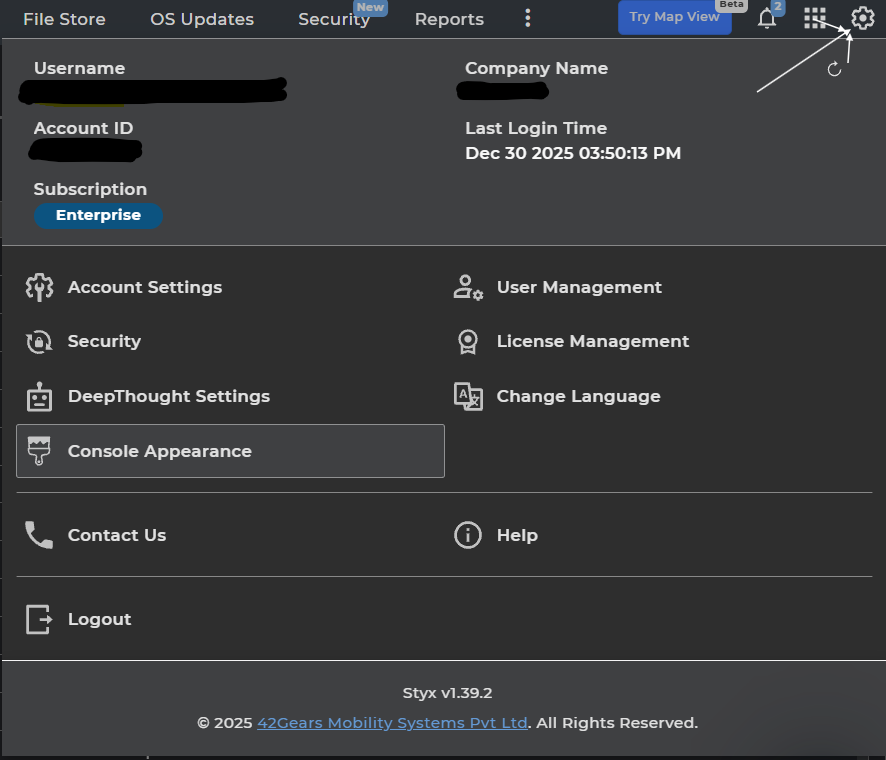
- Select Toast Message under Console Appearance tab
- Admins of the console can select the toast message position either as Top Center, which is selected by default, or Bottom right, as per their convenience, and Apply. This would change the Toast Message positioning, which comes up when any job/profile is saved or modified on the console.
Conclusion
This article explains how to modify the positioning of the Toast Message displayed when Jobs or Profiles are saved in the console. Implementing this change ensures that system notifications appear in a consistent and clearly visible location, thereby improving usability and enhancing the overall console user experience.
Need more help? Here’s how to get help from our experts.
Was this helpful?
YesNo