
Purpose
Using the ADE Profile in SureMDM, administrators can automatically set the device language and region during iOS device enrollment. This ensures devices are configured correctly on first boot, without requiring manual user intervention.
Prerequisites
Access to SureMDM Console with admin privileges
Steps
- Login to the SureMDM Console.
- Go to:
Enrollment → Apple Platform Management → ADE - Select an existing ADE Profile or create a new one.
- Other Configurations -> Expand Miscellaneous → Language and Region fields.
- Enter the appropriate language and region codes.
Reference link for codes: https://developer.apple.com/library/archive/documentation/MacOSX/Conceptual/BPInternational/LanguageandLocaleIDs/LanguageandLocaleIDs.html
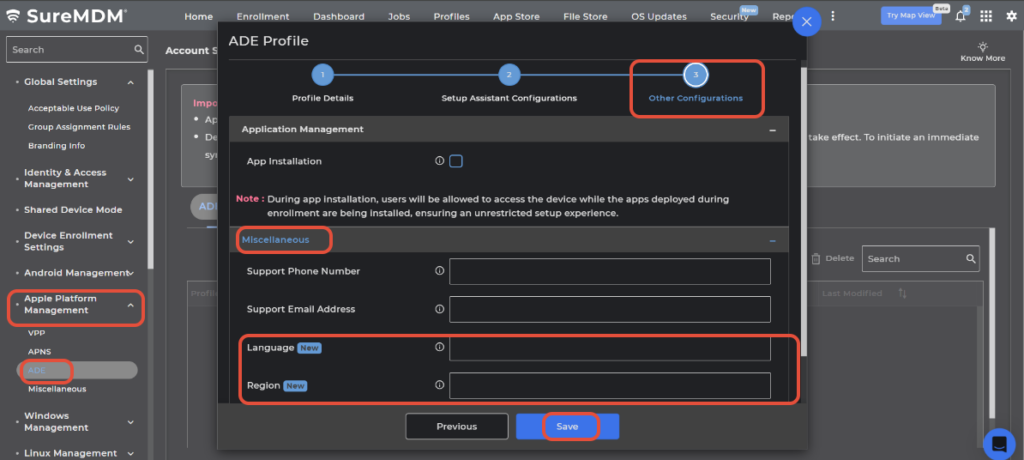
- Save the profile.
Conclusion
SureMDM allows administrators to centrally manage language and region settings on iOS devices, reducing manual effort and ensuring standardization across deployments. This capability is especially useful for organizations managing devices across multiple regions or supporting multilingual users.
Need more help? Here’s how to get help from our experts.
Was this helpful?
YesNo