
Purpose
The purpose of this knowledge article is to explain how administrators can automatically update an Appstore app version across all devices linked to a profile in SureMDM. By assigning a specific app version to a profile, the updated version is automatically pushed to all associated devices, ensuring consistency, security, and reduced manual intervention in app management.
This approach helps administrators centrally control application versions and maintain uniformity across managed devices.
Prerequisites
- Access to the SureMDM console with administrator privileges
- The target application is already added to the Appstore section in SureMDM
- The application has multiple versions available in the Appstore
- A profile is already created and linked to the required devices
Steps
- Log in to the SureMDM Console.
- Navigate to Appstore
- Select the required application from the Appstore list.
- Choose the app version that you want to deploy across devices.
- Click on Assigned Profile for the selected app version.
- Click on Assign Profile
- From the profile selection window, select the profile that is already linked to the target devices.
- Click Yes on the confirmation prompt stating that assigning the selected version will replace the current version in the profile and update all linked devices.
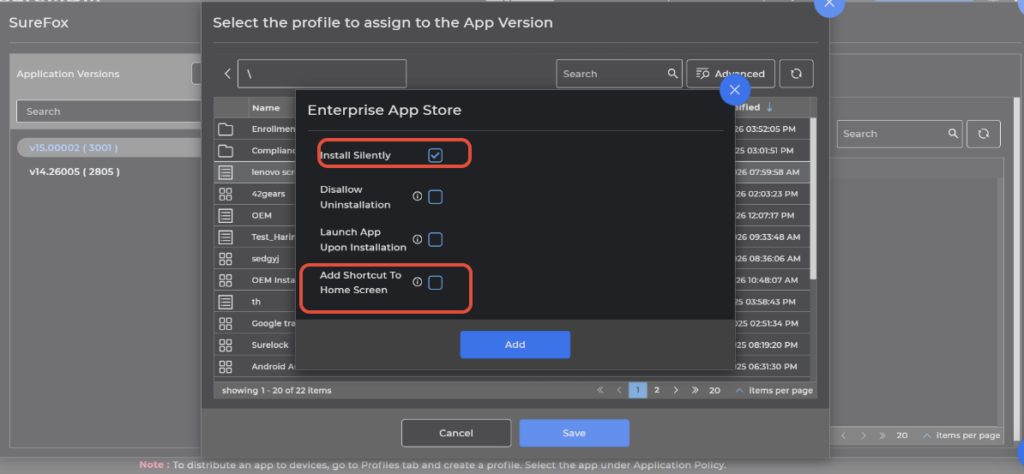
- Check the Install Silently and Add shortcut to Homescreen
- Once confirmed, the selected app version is updated in the profile.
- The updated app version is automatically pushed to all devices where the profile is linked, provided the devices are online.
Conclusion:
Updating an Appstore app version through SureMDM is a streamlined and efficient process. By assigning the required app version to a profile, administrators can automatically update the application across all linked devices without manual intervention. This ensures consistent app versions, improves security, and simplifies application management across the device fleet.
Need more help? Here’s how to get help from our experts.