
Purpose
This article explains how to securely export data from the SureMDM console by configuring export settings to Hide PII or Mask PII, ensuring sensitive information is protected during data export.
Prerequisites
- Administrator access to the SureMDM Console.
Steps:
- Log in to SureMDM Console
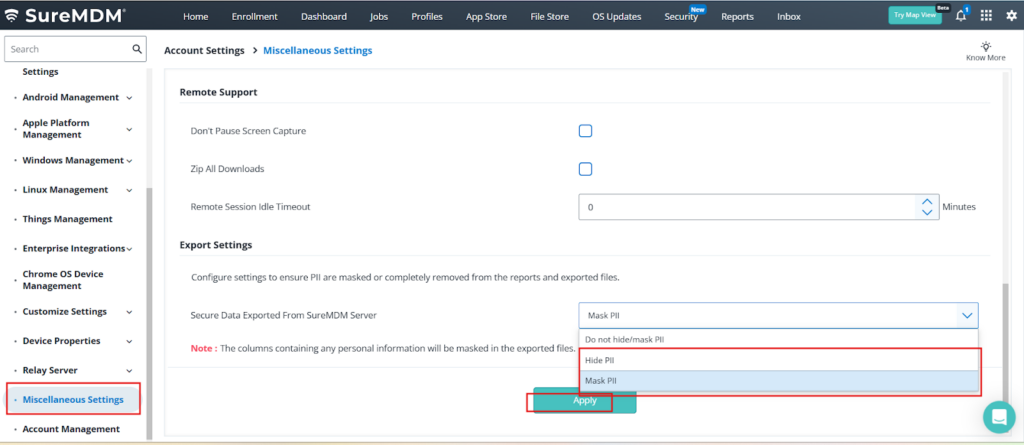
- Navigate to Console Settings.
- Click on Account Settings.
- Go to Miscellaneous Settings.
- Under the Export Settings.
- Choose one of the following options:
- Hide PII – Completely removes Personally Identifiable Information from exported data.
- Mask PII – Partially hides Personally Identifiable Information.
- Click Save to apply the changes.
Before Mask PII:
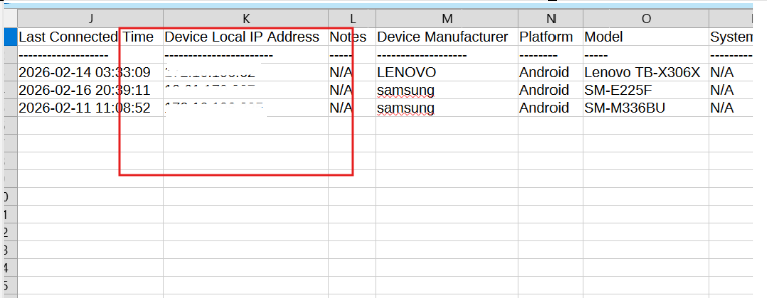
After Mask PII:
Conclusion
By enabling Hide PII or Mask PII under Export Settings in the SureMDM console, administrators can securely export device and user data while maintaining compliance with privacy and data protection policies. This ensures sensitive information is safeguarded during reporting and data sharing.
Need more help? Here’s how to get help from our experts.
Was this helpful?
YesNo