
Purpose
To ensure continuous network connectivity on Wear OS devices, administrators can use the RunScript feature in SureMDM to restrict users from enabling Airplane Mode. This prevents devices from being disconnected from Wi-Fi or cellular networks, ensuring they remain accessible for remote management, monitoring, and communication. This is especially important in enterprise environments where uninterrupted connectivity is critical for device tracking, policy enforcement, and real-time operations.
Prerequisites
- Access to SureMDM Console
- Wear OS device(s) enrolled in SureMDM
- Device(s) online and reachable
- Required permissions to execute Run Script
- Device configured in Device Owner (DO) mode (recommended for full restriction support)
Steps
RunScript to Disable Airplane Mode
- On the SureMDM Console -> Jobs -> New Job
- Select the target Wear OS -> Click on Run Script
- Enter the Job Name and paste the following script:
!#suremdm
DisableAirplaneMode(true)
4. Save and Deploy to the Device.
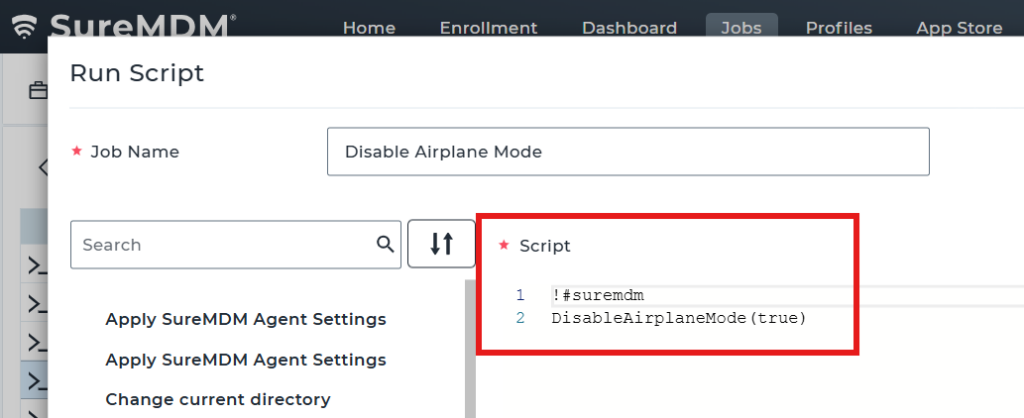
Parameter Explanation:
- true → User is not allowed to enable Airplane Mode (option is disabled/restricted in Settings)
- false → User can enable Airplane Mode
Expected Results
- Airplane Mode option is restricted on the device
- Users cannot enable Airplane Mode when the restriction is applied
- Device remains connected to network services (Wi-Fi/Cellular)
Advantages
- Ensures uninterrupted network connectivity
- Prevents users from disconnecting devices from management
- Improves reliability for real-time monitoring and communication
- Useful for enterprise and critical-use deployments
Conclusion
The RunScript feature in SureMDM enables administrators to effectively restrict Airplane Mode on Wear OS devices, ensuring continuous connectivity and reliable device management in enterprise environments.
Need more help? Here’s how to get help from our experts.