
Purpose
This configuration in SureMDM enables administrators to centrally manage Notifications & Action Center settings on Windows devices. It allows organizations to control how system and application alerts are delivered, ensuring that users receive only relevant notifications while reducing distractions. By enabling or restricting notification access, IT teams can improve productivity, enforce policy compliance, and maintain consistent system behavior across all managed endpoints.
Prerequisites
NA*
Steps
1.Go to the profile section from the top navigation bar.
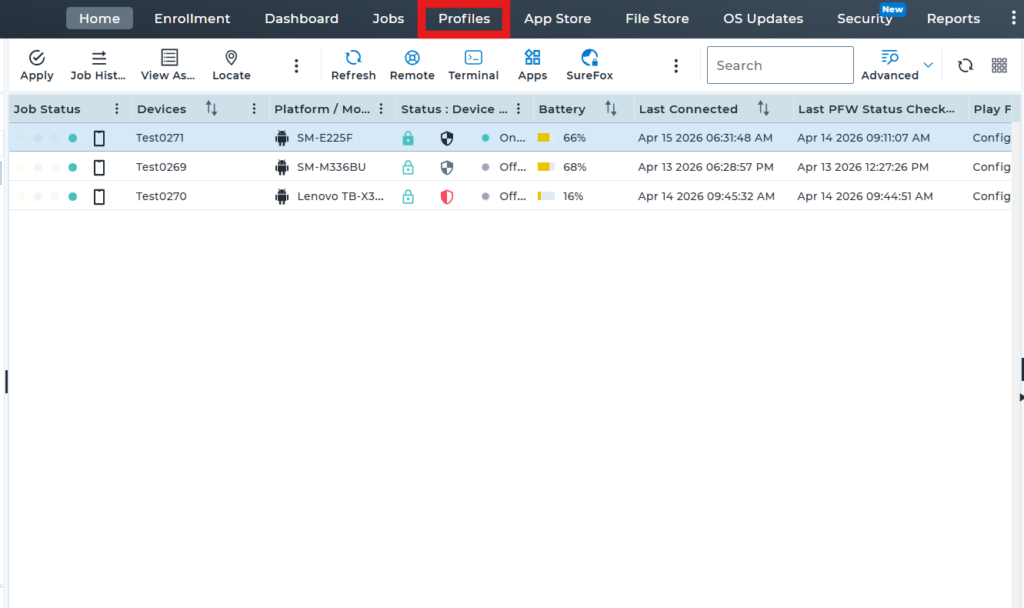
2.Select Windows as the operating system (OS) to create and configure a new profile.
3.In the profile, click on Restriction Policy, then select Configure to view the available features and settings.4.After completing the above step, expand Control Panel and Settings, search for the Notifications & actions option, and disable it. Then, save the profile and deploy it to the device.
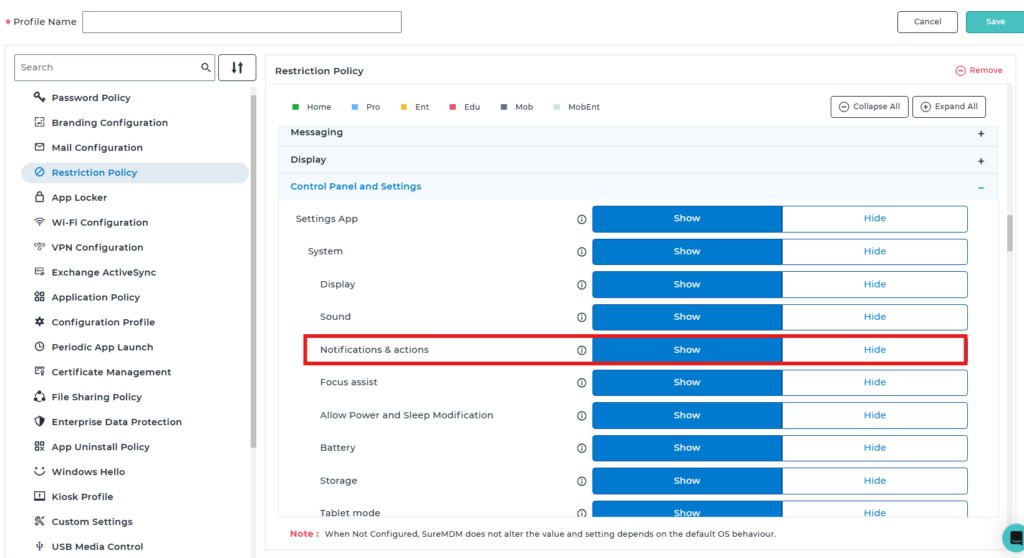
5. After successful deployment of the profile, the Notifications & actions option will be hidden on the device.
Before Profile Deployment:-
After Profile deployment :-
Conclusion
By managing Notifications & Action Center settings through SureMDM, organizations can streamline how alerts and quick actions are accessed on Windows devices. This ensures users stay informed without being overwhelmed, improves focus during critical tasks, and supports a controlled, secure, and standardized digital work environment across the enterprise.
Need more help? Here’s how to get help from our experts.