
Purpose
To prevent unauthorized device resets and maintain continuous management, administrators can use the RunScript feature in SureMDM to block factory reset actions on Wear OS devices. This ensures that users cannot wipe the device through Settings or hardware keys, thereby protecting it from being removed from management. This capability is especially important in enterprise environments where safeguarding sensitive data, maintaining compliance, and ensuring device integrity are critical.
Prerequisites
- Access to SureMDM Console
- Wear OS device(s) enrolled in SureMDM
- Device(s) online and reachable
- Required permissions to execute Run Script
- Device configured in Device Owner (DO) mode (recommended for full restriction support)
Steps
RunScript to Disable Factory Reset
- On the SureMDM Console -> Jobs -> New Job
- Select the target Wear OS -> Click on Run Script
- Enter the Job Name and Enter the following script:
!#suremdm
DisableFactoryReset(true)
4. Save and Deploy to the Device.
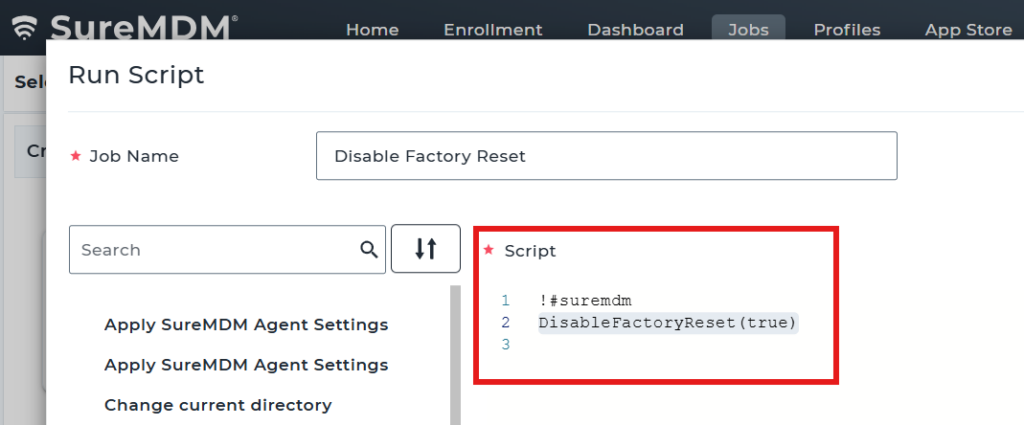
Parameter Explanation:
- true → User is not allowed to perform a factory reset (via Settings or hardware keys)
- false → User can perform a factory reset.
Expected Results
- Factory reset option is blocked on the device
- Users cannot wipe the device using Settings or hardware buttons
- Device remains enrolled and managed at all times
Advantages
- Prevents unauthorized device wipe and data loss
- Ensures continuous device management
- Enhances enterprise security and compliance
- Protects sensitive organizational data
Conclusion
By disabling factory reset using RunScript, administrators can safeguard Wear OS devices from unauthorized resets, ensuring consistent control, security, and device integrity within the organization.
Need more help? Here’s how to get help from our experts.