
Purpose
This feature allows the Administrator to configure multiple email alerts in a Compliance Job under Static Jobs in SureMDM. It helps administrators ensure that compliance notifications are sent to multiple stakeholders by adding multiple email recipients in the alert configuration. This ensures timely awareness of compliance violations, improves monitoring efficiency, and supports better device management and organizational security.
Prerequisites
N/A
Steps
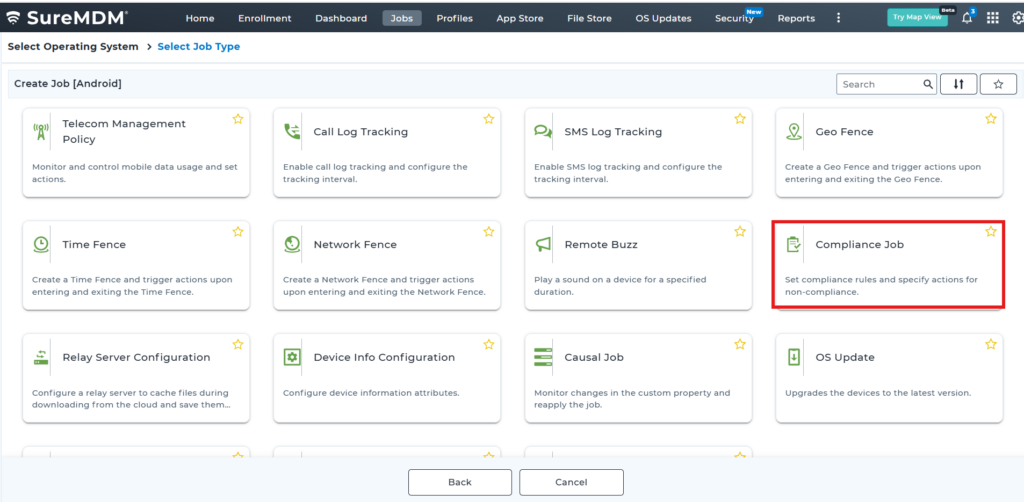
1. Navigate to Jobs -> New Job

2. Select Android and navigate to compliance job
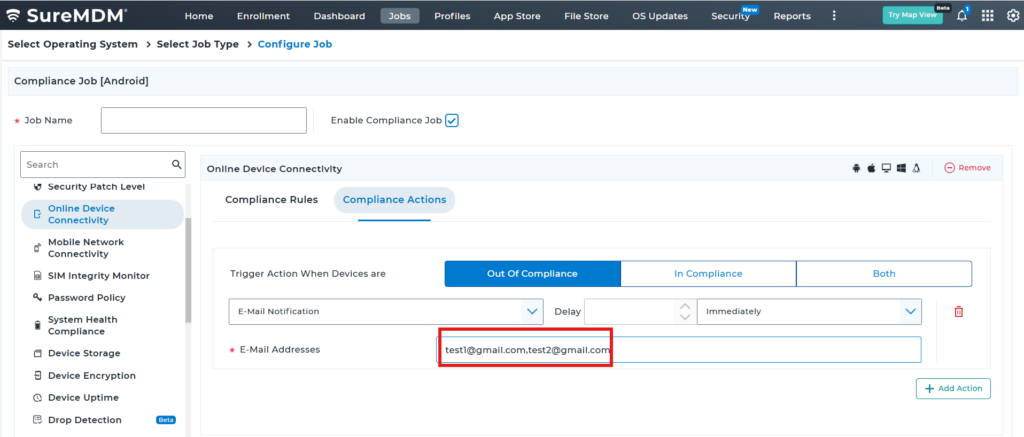
3: Please select any compliance and add the first Email and add the second email along with “,”
Ex : test1@gmail.com,test2@gmail.com
Conclusion:
This gives the ability to configure multiple email alerts in Compliance Jobs enhances communication and visibility across teams by ensuring that all relevant stakeholders receive compliance notifications promptly. This feature improves operational efficiency, supports faster response to compliance issues, and contributes to stronger device management and organizational security within SureMDM.
Need more help? Here’s how to get help from our experts.