
Purpose
This feature allows administrators to manage call recording permissions for individual users by enabling or disabling the call recording functionality based on organizational requirements or user roles. When the feature is enabled, users can record calls for purposes such as documentation, training, compliance, or future reference. If the feature is disabled, users will not have access to the call recording option and will be restricted from recording any calls. This functionality helps organizations maintain better control over privacy, security, and regulatory compliance while ensuring that recording access is granted only to authorized users.
Prerequisites
Use this control to allow or restrict the device’s ability to use call recording function. Available with Knox 3.13 and later on US models only.
Steps
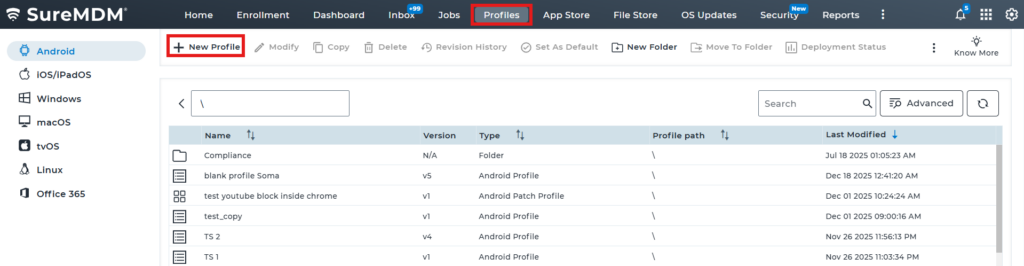
1. Navigate to Profiles and select New Profile.
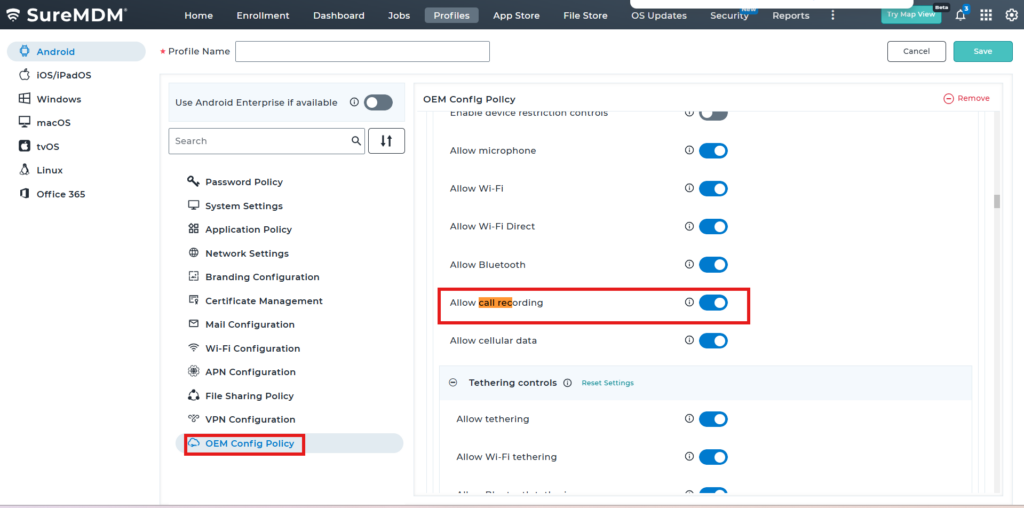
2. Navigate to OEM Config policy -> And select Knox Service Plugin(Samsung)
3: And you will find the option ”Allow call recording” please enable or disable according to your requirement
Conclusion
Using the Samsung OEMConfig policy in SureMDM, administrators have centralized control over call recording access, ensuring that only authorized users can record calls. By enabling or disabling recording permissions as needed, organizations can effectively manage privacy, security, and compliance requirements while maintaining operational flexibility and control over communication practices.
Need more help? Here’s how to get help from our experts.