
Purpose
To improve navigation efficiency and speed within the SureMDM console by using built-in keyboard shortcuts for common actions such as search, device management, and configuration tasks.
Prerequisites
- Access to SureMDM Console
- Required Console Level Access to perform the tasks
Steps
- Log in to the SureMDM Console
- Click on the Gears (Settings) icon at the top-right corner
- Select Help and click on Keyboard Shortcuts
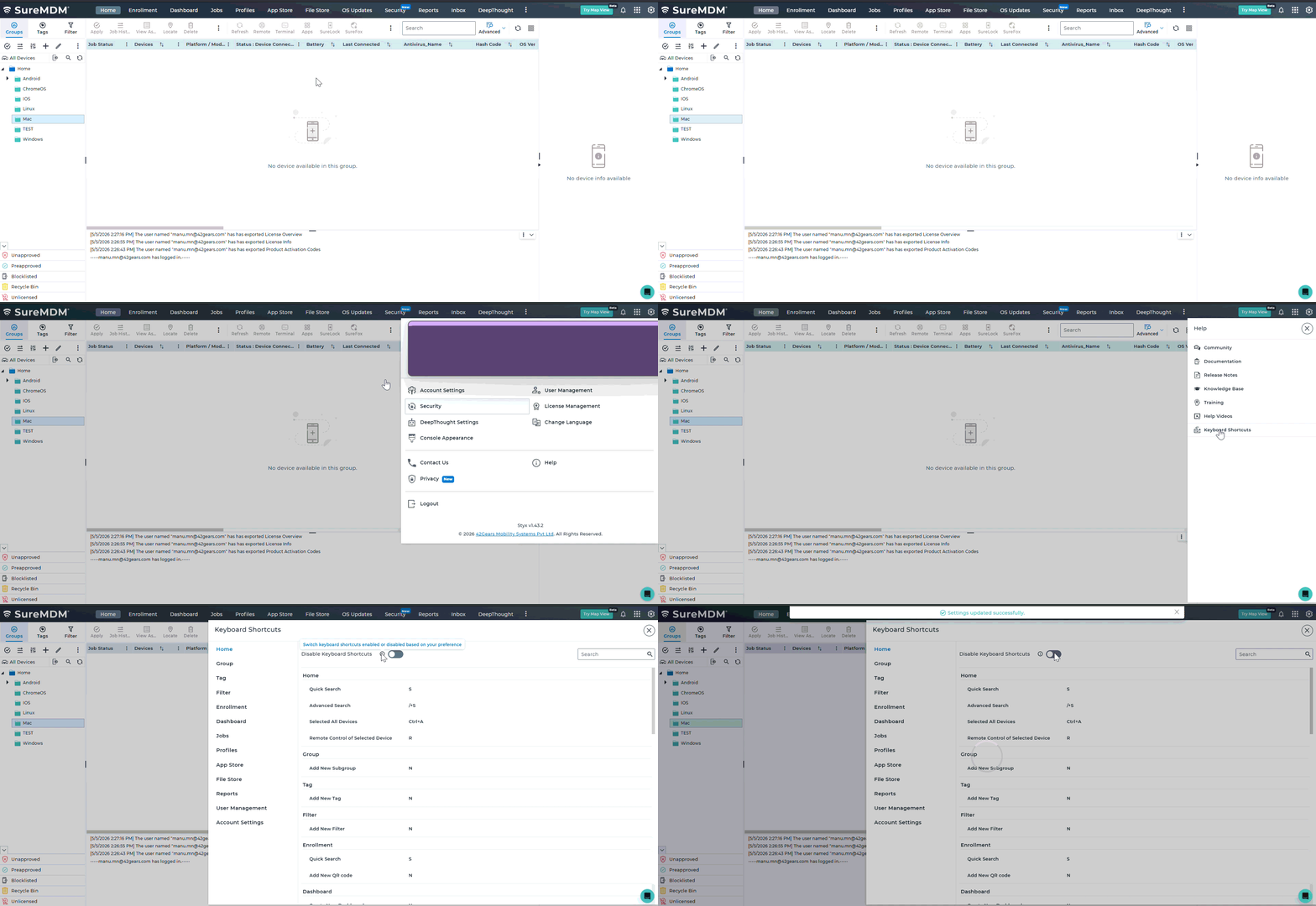
4. Disable Keyboard Shortcuts : Toggle the Disable Keyboard Shortcuts option at the top of the window to turn off shortcuts if needed
5. Search Bar: Use the search bar within the Keyboard Shortcuts window to quickly find specific shortcuts
Keyboard Shortcuts Overview
The Keyboard Shortcuts window displays all supported shortcuts categorized by console sections. These shortcuts help perform actions quickly without navigating through menus.
(Home, Group, Tag, Filter, Enrollment, Dashboard, Jobs, Profiles, App Store, File Store, Reports, User Management and Account Settings)
| Section | Action | Shortcut |
| Home | Quick Search | S |
| Advanced Search | /+S | |
| Select All Devices | Ctrl + A | |
| Remote Control (Selected Device) | R | |
| Group | Add New Subgroup | N |
| Tag | Add New Tag | N |
| Filter | Add New Filter | N |
| Enrollment | Quick Search | S |
| Add New QR Code | N | |
| Dashboard | Create New Dashboard | N |
| Add Chart | N | |
| Jobs | Quick Search | S |
| Select All Jobs | Ctrl + A | |
| Add New Job | N | |
| Modify Job/Folder | M | |
| Add New Folder | F | |
| Profiles | Quick Search | S |
| Select All Profiles | Ctrl + A | |
| Add New Profile | N | |
| Modify Profile/Folder | M | |
| Add New Folder | F | |
| App Store | Quick Search | S |
| File Store | Add New Folder | F |
| Reports | Quick Search | S |
| Select All Reports | Ctrl + A | |
| User Management | Create New User | N |
| Enable/Disable User | X | |
| Account Settings | Quick Search | S |
Home & General Navigation
| Action | Shortcut |
| Quick Search | S |
| Advanced Search | /+S |
| Select All Devices | Ctrl + A |
| Remote Control (Selected Device) | R |
Group, Tag, and Filter Sections
| Section | Action | Shortcut |
| Group | Add New Subgroup | N |
| Tag | Add New Tag | N |
| Filter | Add New Filter | N |
Enrollment Section
| Action | Shortcut |
| Quick Search | S |
| Add New QR Code | N |
Dashboard Section
| Action | Shortcut |
| Create New Dashboard | N |
| Add Chart | N |
Jobs Section
| Action | Shortcut |
| Quick Search | S |
| Select All Jobs | Ctrl + A |
| Add New Job | N |
| Modify Job/Folder | M |
| Add New Folder | F |
Profiles Section
| Action | Shortcut |
| Quick Search | S |
| Select All Profiles | Ctrl + A |
| Add New Profile | N |
| Modify Profile/Folder | M |
| Add New Folder | F |
App Store Section
| Action | Shortcut |
| Quick Search | S |
File Store Section
| Action | Shortcut |
| Add New Folder | F |
Reports Section
| Action | Shortcut |
| Quick Search | S |
| Select All Reports | Ctrl + A |
User Management Section
| Action | Shortcut |
| Create New User | N |
| Enable/Disable User | X |
Account Settings Section
| Action | Shortcut |
| Quick Search | S |
Expected Results
- The Keyboard Shortcuts page is displayed with categorized shortcuts
- Users can quickly perform actions using keyboard inputs
- Navigation and administrative efficiency are improved
Conclusion
Using keyboard shortcuts in SureMDM significantly reduces the time required to perform routine tasks. With consistent key patterns across sections, administrators can manage devices and configurations more efficiently.
Need help?