
Purpose
To export licensing information, license usage details, and product activation codes from the SureMDM console for auditing, reporting, and record-keeping purposes using the built-in export feature.
Prerequisites
- Access to SureMDM Console
- Valid login credentials with administrative permissions
- Active SureMDM subscription
Steps
- Log in to the SureMDM Console
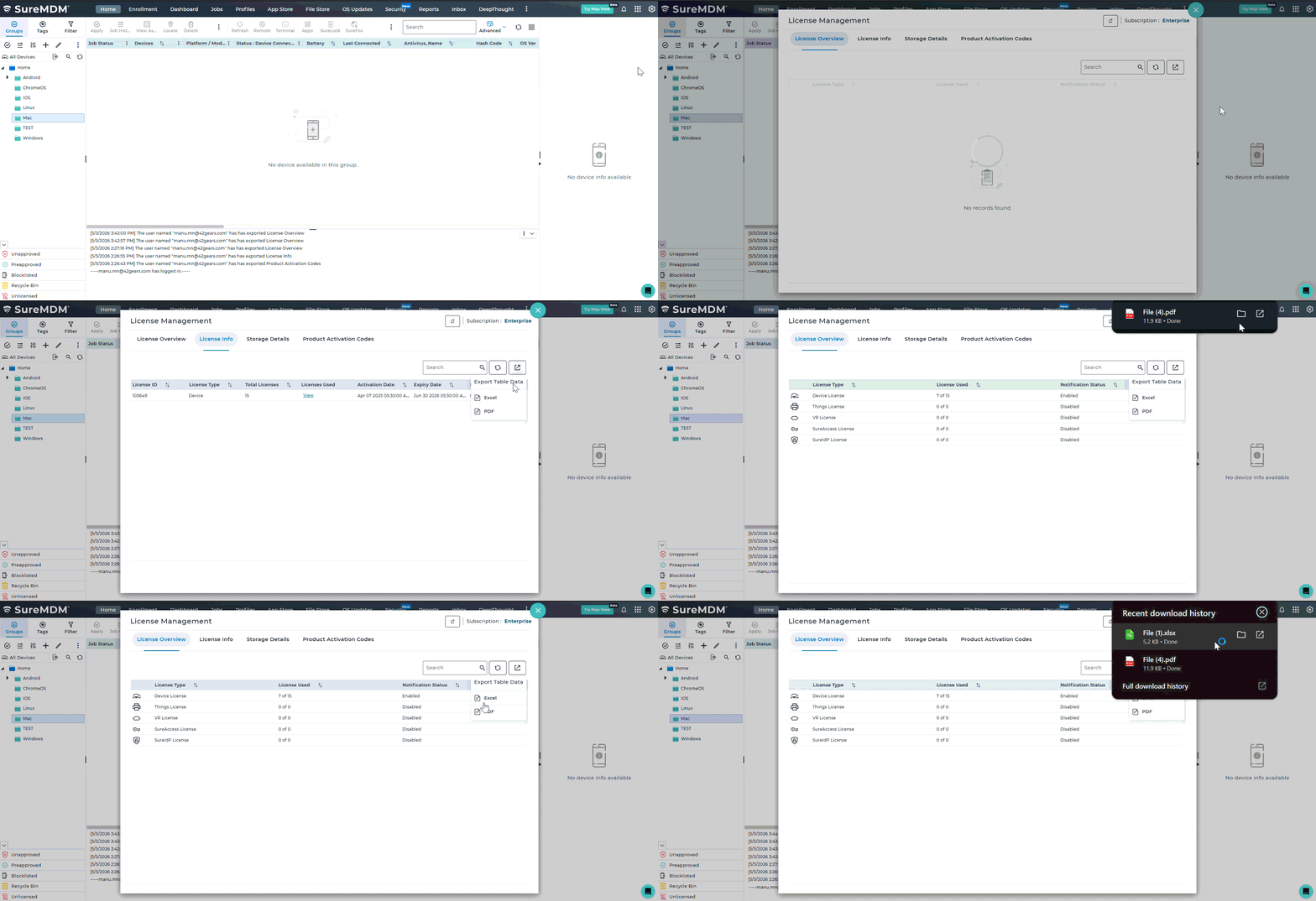
- Click on the Gears (Settings) icon at the top-right corner
- Select License Management
- Navigate to the required tab:
- License Overview
- License Info
- Product Activation Codes
- Click on the Export icon (top-right corner of the panel)
- Select the preferred format:
- Excel (.xlsx)
- PDF (.pdf)
Expected Results
- The system generates a file in the selected format (Excel or PDF)
- The exported file contains data based on the selected tab:
- License Overview – License type, usage, and notification status
- License Info – Detailed license information and status
- Product Activation Codes – Associated activation codes
Conclusion
Exporting License Management details in SureMDM enables administrators to maintain offline records, monitor license usage, and simplify auditing processes. This helps ensure better visibility and control over license consumption and activation data.
Need help?
Was this helpful?
YesNo