
Purpose
This knowledge base article explains the process of renewing the Apple Device Enrollment (ADE) server token on the SureMDM console. The ADE server token is a critical component that enables seamless communication between Apple Business Manager (ABM) and SureMDM for automated device enrollment and management.
Renewing the token before it expires ensures uninterrupted device enrollment, prevents assignment failures for new or re-enrolled Apple devices, and maintains continued integration between Apple services and the SureMDM platform.
Prerequisites
ABM portal access and SureMDM console
Steps
1. Log in to the SureMDM console -> Navigate to Apple Platform Management -> ADE -> ADE Server -> Check if the ADE server token is expired
1.1
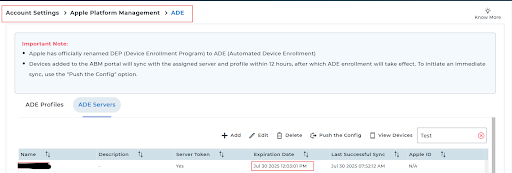
1.2 Select the ADE server and click on Edit >> Next, Download the .pem certificate.
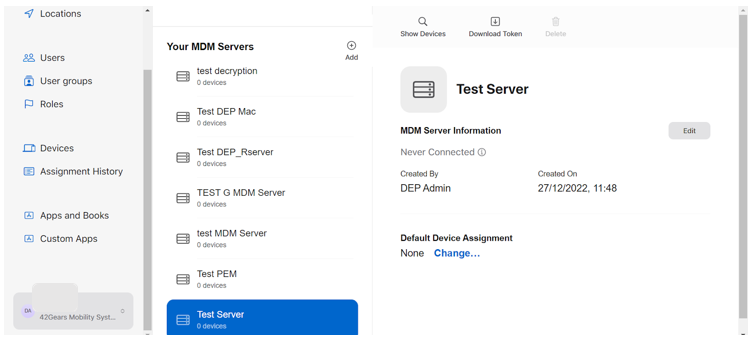
- Log in to the Apple Business Manager account > select the respective server created, which was earlier linked to the respective SureMDM ADE server >Click on the 3 dots>>Edit>>Upload Download.pem certificate>>save
- Once saved, download the p7m certificate. Go back to the SureMDM console, click on Upload Token > Upload the downloaded token(.p7m certificate) from the ABM portal across the “Server Token” field visible.
Conclusion
It is recommended to monitor the token expiry date in advance and complete the renewal process well before expiration. This proactive approach helps maintain system reliability and ensures that Apple devices can continue to be enrolled and managed without any impact on end users.
Need more help? Here’s how to get help from our experts.