
Purpose
Any third-party application approved under custom properties will Allow SureMDM Agent to share the Custom Property Data. Follow the below steps to approve your application to collect the Custom Property Data from SureMDM Agent.
Prerequisites
Signature Hash Key.
Steps
- Login to the SureMDM console.
- Go to Settings by clicking on settings icon at the top left corner -> Account Settings
- Click on custom properties -> Approved Apps
- Click on Add option to Add your application
- On Add Application, you need to enter the Application’s name, Package name,, and Signature Key. For example: CustomPropertyApp.
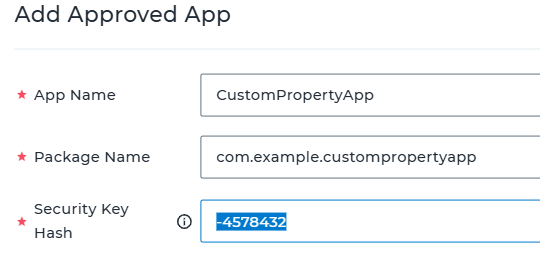
- To obtain the Signature Key Hash for the desired application. You can install the application on your device and navigate to “Application List” -> Select App -> Signature Key column.

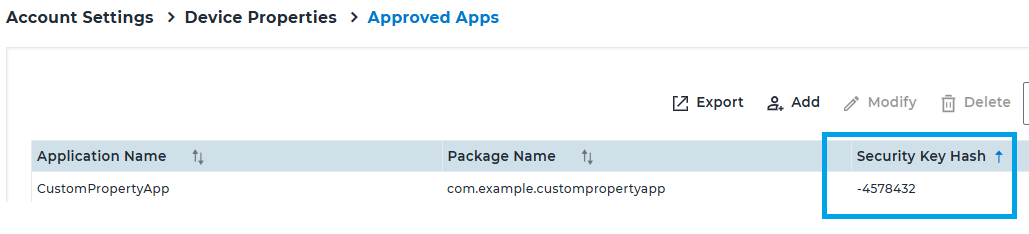
- Once you have the Signature Key Hash, You can add and enter the same value under “Approved Apps”. It should be visible as shown below in the example.
- You need to check the box – Allow SureMDM Agent To Share Custom Property Data Including the PII With This Approved Application. For More Information, Please Check Our Privacy Policy.
- Click on Save.
Need more help? Here’s how to get help from our experts.
Was this helpful?
YesNo