
Purpose
This article explains how to clear job history from the SureMDM console.Clearing job history helps administrators maintain a clean console view by removing old or unnecessary static job records.
Prerequisites
- Access to the SureMDM web console.
- Administrator privileges to access Account Management settings.
Steps
- Log in to the SureMDM Web Console.
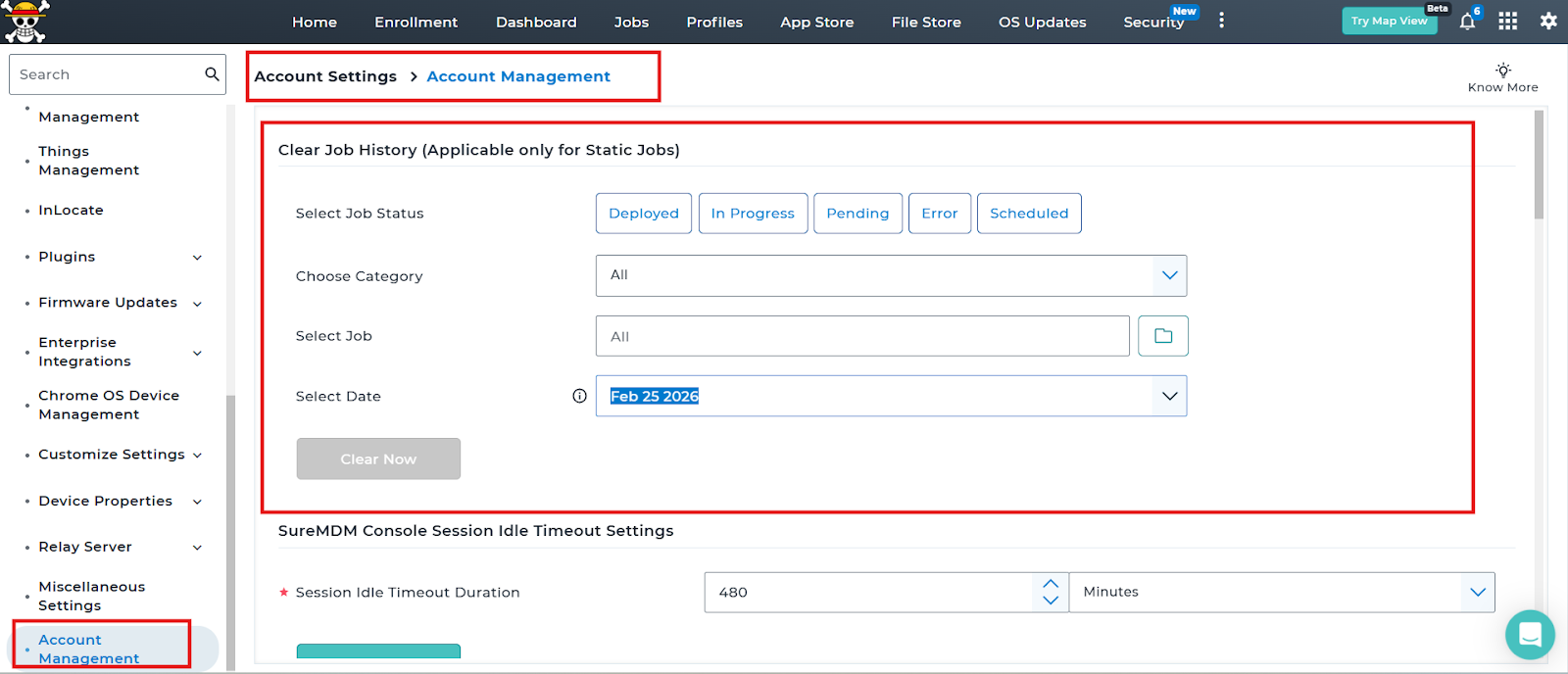
- Navigate to Account Settings > Account Management.
- Go to the Clear Job History (Applicable only for Static Jobs) section.
- Under Select Job Status, choose the required status:
- Deployed
- In Progress
- Pending
- Error
- Scheduled
- Under Choose Category, select the required category ( All, Groups, tags, filter).
- Under Select Job, choose the specific job or keep it as All.
- Under Select Date, choose the date up to which the job history should be cleared.
- Click on clear now.
Note: Completed and Errored jobs will be deleted from the job history but retained internally for assignment mapping. In Progress, Pending, and Scheduled jobs will be deleted permanently.
- It will take some time to clear the jobs in history and show the
note: Job queue clearance is in progress. Please wait!
Conclusion
Using the Clear Job History option in SureMDM, administrators can efficiently remove outdated or unnecessary static job records. This helps maintain better console performance and improves overall job management visibility.
Need more help? Here’s how to get help from our experts.
Was this helpful?
YesNo