
Purpose
The purpose of this article is to provide guidance on configuring and using the App Usage plugin in SureLock. This feature allows administrators to monitor device usage metrics and control access to the App Usage application through password protection.
Prerequisites
- SureLock installed and configured on the Android device
- App Usage plugin enabled and accessible on the SureLock Home Screen
- Admin access to SureLock settings
Steps
1. Launch App Usage Plugin
- Tap 5 times on the SureLock Kiosk screen to open the Admin Settings.
- Enter the password to access SureLock Admin Settings.
- Tap on Quick Settings.
- In the search bar, search for the “App Usage” plugin.
- Select the App Usage plugin and tap Next.
- Choose the Application Screen Size as required.
- Tap Launch to open the App Usage plugin.
2. View App Usage Metrics
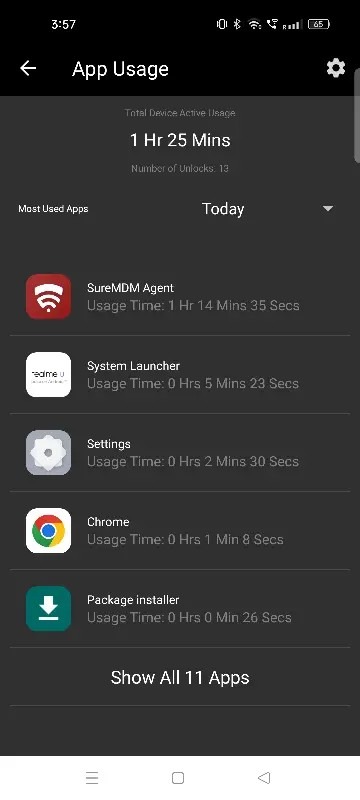
On the App Usage screen, administrators can view the following details:
- Total Device Active Usage – Displays the total time the device has been actively used.
- Number of Unlocks – Shows how many times the device has been unlocked.
Note: Use the drop-down menu below these metrics to filter data for Today, Yesterday, Last 1 Week, or Last 1 Month.
3. Configure App Usage Settings
On the App Usage screen, tap the Settings icon.
- Password Protect App
- Enable this option to secure access to the App Usage plugin.
- Once enabled, users will be required to enter a password to open the application.
- Set/Change Password – Use this option to create a new password or update the existing password for the plugin.
Conclusion
The App Usage plugin in SureLock helps administrators monitor device activity and user behavior effectively. With built-in filtering options and password protection, it ensures both visibility and security for device usage data.
Need more help? Here’s how to get help from our experts.