
Purpose
To enable secure enterprise Wi-Fi connectivity, administrators can configure EAP-TLS authentication on Wear OS devices using RunScript in SureMDM. This allows deployment of Wi-Fi profiles that use certificate-based authentication.
Prerequisites
- Access to the SureMDM console
- Wear OS devices enrolled in Device Owner (DO) mode
- Required certificates (CA certificate and user certificate) available on the device
- SureMDM Agent with Run Script capability
- And, This feature is supported only in Device Owner (DO) mode
Steps
- On the SureMDM Console -> Jobs -> New Job -> select Wear OS
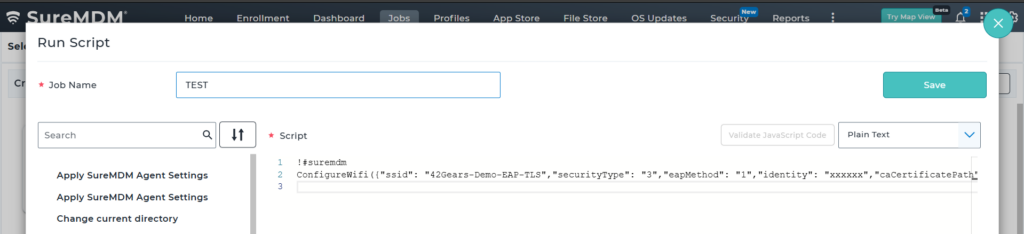
- Click on Run Script -> Enter the Job Name and the following script:
!#suremdm
ConfigureWifi({“ssid”: “42Gears-Demo-EAP-TLS”,”securityType”: “3”,”eapMethod”: “1”,”identity”: “xxxxxx”,”caCertificatePath”: “/data/data/com.nixwear/files/CA-Sureteam-01.cer”,”domain”: “xxxxxx”,”userCertificatePath”: “/data/data/com.nixwear/files/scep user.pfx”,”userCertificatePassword”: “xxxxxx”,”connectAutomatically”: “true”})
- Click on Save
Expected Results
- Device connects to the specified Wi-Fi network using EAP-TLS authentication
- Certificate-based authentication is successfully applied
- Secure enterprise network access is established
Advantages
- Provides high-level enterprise security using certificates
- Eliminates dependency on passwords for Wi-Fi authentication
- Ensures secure and encrypted communication
- Supports compliance with enterprise network policies
Conclusion
With RunScript support for EAP-TLS Wi-Fi, administrators can securely deploy certificate-based network configurations to Wear OS devices, enabling robust and compliant enterprise connectivity.
Need more help? Here’s how to get help from our experts.
CONTACT US