
Purpose
This feature allows the administrator to disable Bluetooth contact sharing on BYOD (Profile Owner) devices using a SureMDM profile, preventing Bluetooth devices from accessing enterprise contacts.
Prerequisites
The device should be enrolled in Profile Owner mode.
Steps
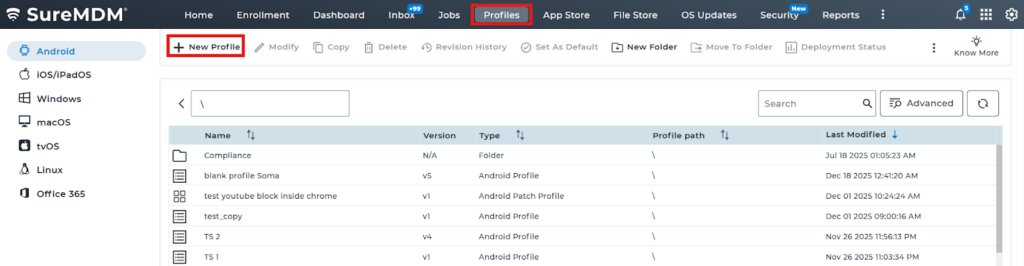
1. Navigate to Profiles and select New Profile.
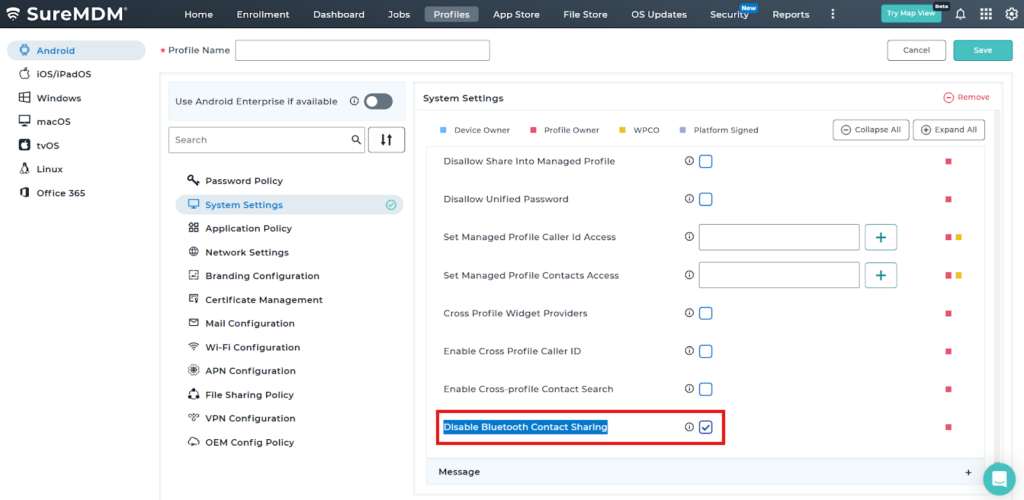
2. Navigate to System settings.
3: Navigate to Work and personal and enable “Disable Bluetooth Contact Sharing”
Conclusion
Disabling NFC Radio using a profile in the SureMDM Console allows administrators to effectively control device hardware features, enhancing security and preventing unauthorized data exchange.
Need more help? Here’s how to get help from our experts.
Was this helpful?
YesNo