
Purpose
This feature allows the administrator to disable NFC radios on a device trough profile in the SureMDM console. Which helps to manage NFC functionality on supported devices, ensuring better control over device hardware features and improving organizational security.
Prerequisites
It is supported on Android 15 devices and SureMDM agent Version: 28.57.00
Steps
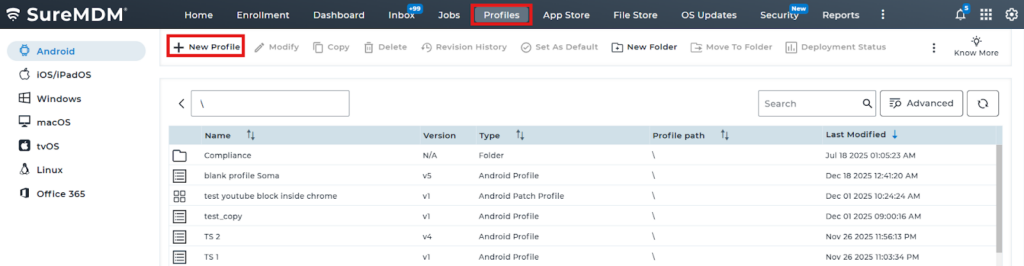
1. Navigate to Profiles and select New Profile.
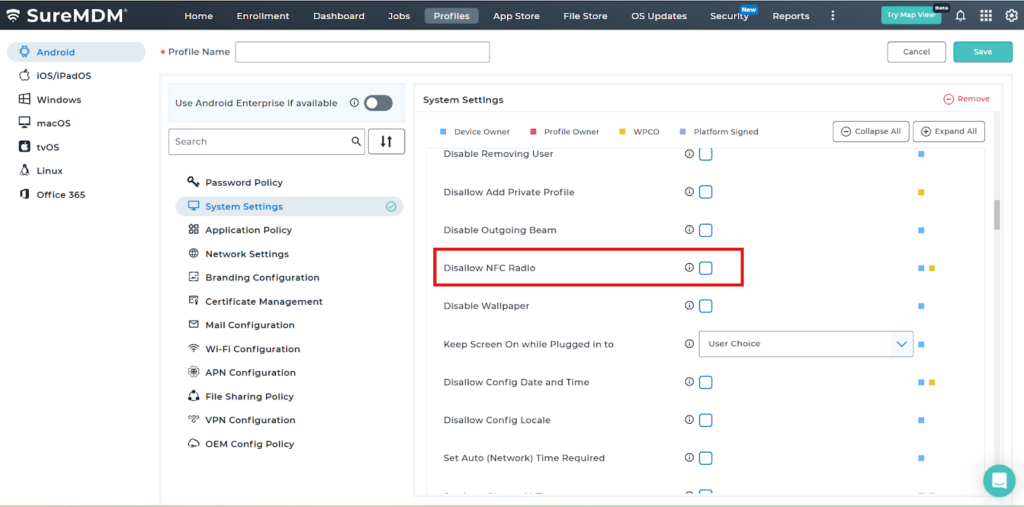
2. Navigate to System settings.
3: Scroll down the list and enable “Disallow NFC radio”
Conclusion:
Disabling NFC Radio using a profile in the SureMDM Console allows administrators to effectively control device hardware features, enhancing security and preventing unauthorized data exchange.
Need more help? Here’s how to get help from our experts.
Was this helpful?
YesNo