
Purpose
This guide outlines how to prevent unauthorized hard factory resets on Samsung Enterprise devices managed via SureMDM. By deploying a Knox Service Plugin (KSP) profile through OEMConfig, administrators can enforce device restrictions, block developer access, and secure device management settings to lower the risk of data loss or unauthorized device clearing.
Prerequisites
- SureMDM Console Access: Administrator privileges to create and deploy profiles.
- Samsung Knox Service Plugin (KSP): Approved/added to your managed Google Play account and synced with SureMDM.
- Supported Devices: Samsung Android devices fully enrolled in Knox / Android Enterprise (Device Owner / Fully Managed mode).
Steps
- Log in to the SureMDM Console.
- Go to Profiles and select the Android platform.
- Select Primary Profile (or create a new profile).
- Click on OEMConfig Policy from the policy list.
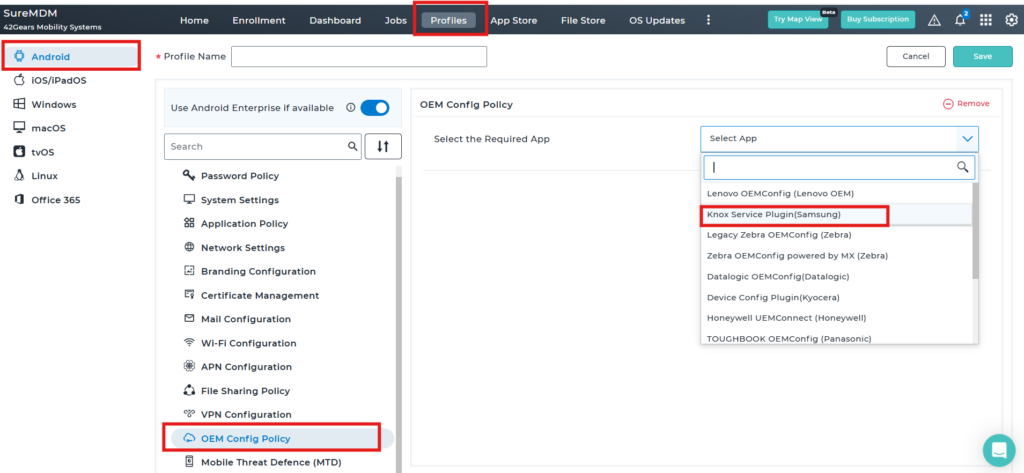
- Click and Expand all, and Search for Allow Factory reset and Disable it.

- Search for Enable device restriction controls and enable the toggle button.
- Click on save to save the configuration and select the saved profile, by navigating to the console Home grid and selecting the targeted device(s).
- Apply and deploy the profile to your target Samsung device group or specific devices.
- Search for Allow USB Debugging and Allow developer mode, and disable the toggle button for both options as shown in the screenshot below.
- Search for Enable device policy controls and enable the toggle button.
- Save the profile and deploy it to the device.
Conclusion
By configuring the OEM Config Policy through the Knox Service Plugin in SureMDM, administrators can prevent unauthorized hard factory resets on Samsung devices and strengthen device security. Disabling factory reset options, restricting USB debugging and developer mode, and enabling device restriction and policy controls ensures that devices remain managed and protected according to organizational requirements. After saving and deploying the updated profile, the applied restrictions help maintain control over enrolled Samsung devices and reduce the risk of unauthorized access or data loss.
Need more help? Here’s how to get help from our experts.
CONTACT US