
Purpose
This article describes how to guide administrators to hide or show the quick settings tiles (such as Wi-Fi, Bluetooth, Hotspot, etc.) on Zebra devices outside of SureLock.
This option would help the administrator to keep the end users device security postures and with limited access to the important settings modification.
Prerequisites
- Zebra Android Devices with MX: 10.5+
- The OEM agent should be greater than v1.33.
- The SureMDM agent version should be greater than v27.32.00.
Steps
- Log in to the SureMDM console.
- Navigate to the Jobs section and click on New Job.
- Select the OS as Android and select Zebra MX Config.
- In the section, insert the XML available below, as shown in the image
Sample:
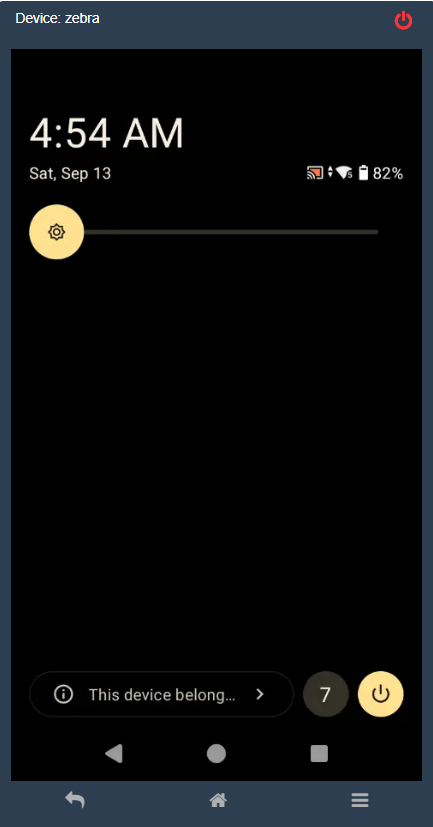
To Show All Quick Tiles:
<wap-provisioningdoc>
<characteristic version=”13.2″ type=”UiMgr”>
<parm name=”NotificationPullDown” value=”1″/>
<parm name=”QuickSettings” value=”1″/>
<parm name=”QuickTileEdit” value=”2″/>
<parm name=”QuickTileAction” value=”1″/>
</characteristic>
</wap-provisioningdoc>
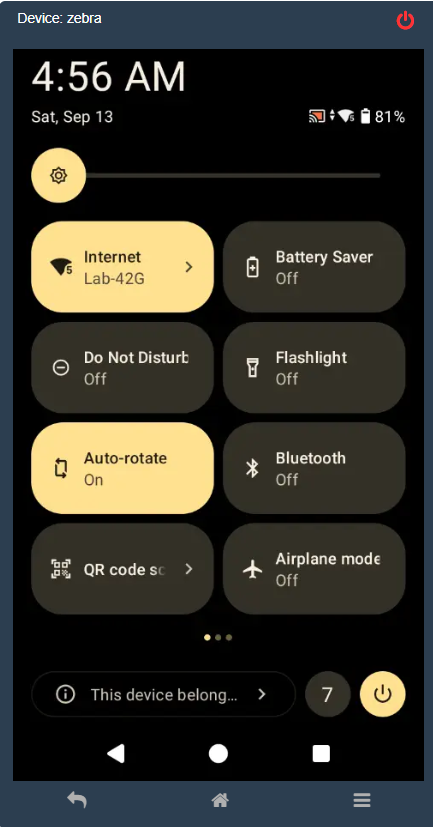
To Hide All Quick Tiles:
<wap-provisioningdoc>
<characteristic version=”13.2″ type=”UiMgr”>
<parm name=”QuickTileAction” value=”2″/>
</characteristic>
</wap-provisioningdoc>
Conclusion
Using the runscript job with the available zebra XML script, an Administrator will be easily able to hide or unhide the quick tiles, by giving less visibility to the end users. This option can be utilised when an Administrator wants to give a minimal access to the quick tiles tabs.
Need more help? Here’s how to get help from our experts.