
Purpose
In enterprise environments, controlling mobile data usage is essential to enforce data policies and reduce unnecessary consumption. Manually toggling data settings on individual devices can be inefficient and impractical for large deployments.
To address this, SureMDM allows administrators to remotely enable or disable Mobile Data on Lenovo devices running Android 15 and above using a RunScript command. This feature provides IT teams with greater control over cellular data usage, ensuring compliance with organizational requirements and improving overall management efficiency.
Prerequisites
- The device must be a Lenovo Android 15 or later model.
- The device must have the latest version of the Lenovo OEM Agent installed.
- Access to the SureMDM Console with permissions to create and deploy RunScript jobs.
Steps
- Log in to the SureMDM Console.
- Navigate to Jobs -> New Job -> Android -> Run Script
- Enter the Job Name and Enter the below Script
!#suremdm
TurnOnMobileData(true)
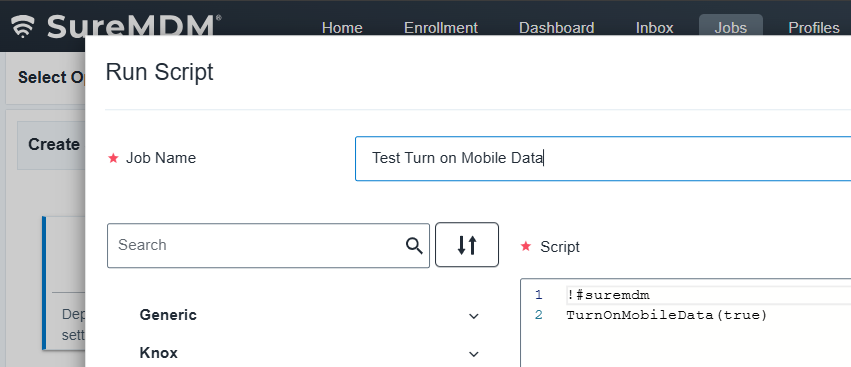
Note – You can Mention as true -> To enable mobile data and false-> To disable mobile data
4. Click on Save to create the job.
Expected Results
Once the RunScript job executes successfully, mobile data on the Lenovo device will be toggled according to the specified command.
You can verify the change on the device by navigating to:
Settings → Network & Internet → SIMs → Mobile Data
Conclusion
The Mobile Data Toggle Support feature allows administrators to remotely manage cellular data settings on Lenovo devices running Android 15 and above. By leveraging this RunScript command, IT teams can efficiently control mobile data usage, maintain policy compliance, and streamline device management operations.
Need help?
CONTACT US