
Purpose
The Lost Mode Job helps the admin remotely lock a lost or stolen device, display a custom message with contact details, enable location, and enforce a secure password to protect sensitive data on the enrolled device(s).
This will enable the administrator to view the status of Lost mode deployment status on the device directly via Column in Device Grid providing immediate visibility into the security state of their fleet,
Prerequisite
- A SureMDM Account
- Applicable for Android, iOS/iPadOS and Windows devices.
- Enable the Lost mode job on the devices via Lost Mode job, you may refer to below documentation to enable lost mode job on devices: https://www.42gears.com/blog/a-guide-to-lost-mode-for-ios-android-and-windows/
Steps
- Login to SureMDM console.
- Deploy the Lost mode jobs on the devices following the steps provided on Pre-requisite no. 3
- Go to Columns -> Grid Columns -> Search for Lost mode status -> Enable and Save it
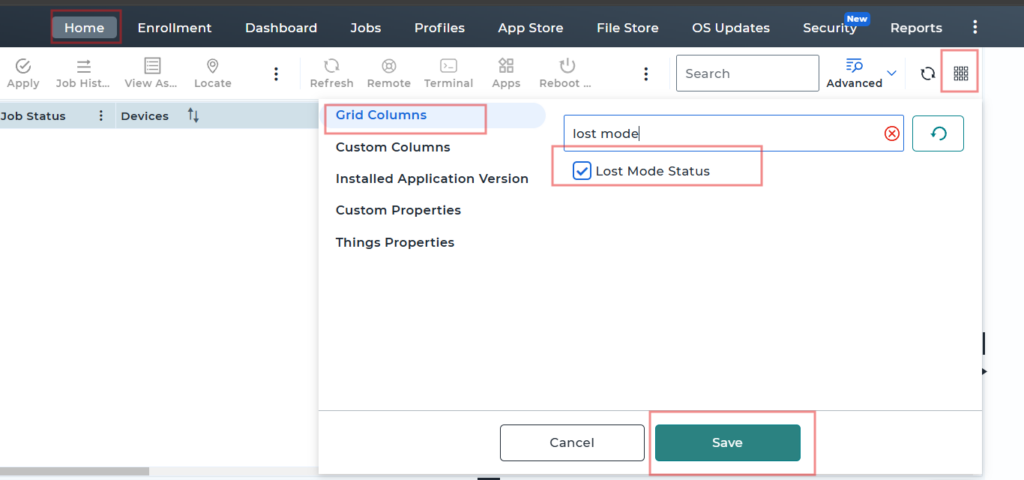
- Now the status would be visible on the console

The new column displays three distinct states:
- Enabled: Lost Mode is currently active on the device.
- Disabled: Lost Mode has been manually turned off or deactivated.
- N/A: No Lost Mode job has ever been deployed to the device since its registration with the console.
Note: This feature requires SureMDM Agent version 28.58.04 or later for Android devices.
Need more help? Here’s how to get help from our experts.
Was this helpful?
YesNo