
SureLock allows administrators to use Script Injection for internal (intranet-hosted) websites. By hosting a JavaScript file and linking it through the settings, the script can be injected into the allowed webpage to control how it appears and behaves on the device.
The key idea is to provide deeper customization of intranet web pages displayed inside the kiosk browser. Using a hosted script and an optional XML-based configuration, administrators can make layout and alignment adjustments based on device resolution and screen size.
Purpose
This Article provides a step-by-step guide on how to customize the appearance and alignment of intranet webpages opened in SureLock using Script Injection.
Prerequists
This feature is supported on Android devices with SureMDM Agent 28.54.64 and standalone SureLock version = ‘22.54.64’
Steps
- Navigate to the SureLock admin settings.
- Click on Manage Websites.
- Navigate to the Browser preference and then Advance settings.
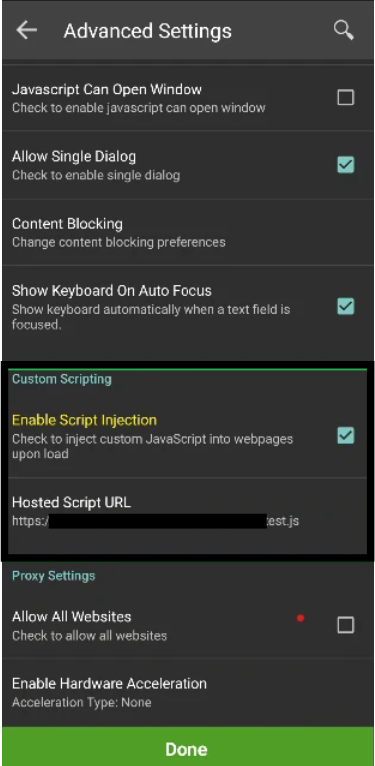
- Under Custom scripting, Enable Script Injection
- Tap on Hosted Script URL and then enter the Hosted Javascript URL.
- Navigate to the Managed websites>>Allowed websites click on Add URL
- Select the appropriate web protocol
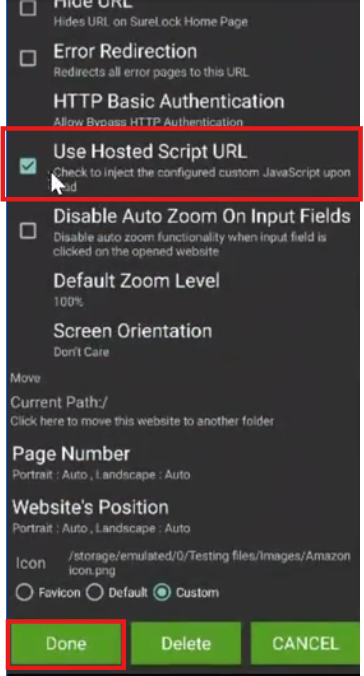
- enter the HTML URL or select an HTML file, scroll down, and then enable the Hosted Script URL checkbox.
Click below to view the sample JavaScript file
https://venus.astrouploads.com/products/customer_sharing/samplejsfile.js
Conclusion:
SureLock provides a flexible way to customize the appearance and alignment of intranet-hosted websites on Android devices. By configuring a hosted JavaScript URL and linking it to allowed websites, administrators can apply fine-grained layout adjustments tailored to different screen sizes and resolutions.
Once enabled, the injected script ensures a consistent and optimized viewing experience across devices. Additionally, since the script is cached locally after initial configuration, the customizations continue to function even when the device is offline. This makes it a reliable solution for organizations that rely on internally hosted web applications within a controlled kiosk environment.
Need more help? Here’s how to get help from our experts.