
Purpose
To manage and control Bluetooth functionality on Wear OS devices, administrators can use the RunScript feature in SureMDM to remotely enable, disable, or restrict user access to Bluetooth settings. This capability helps enforce organizational policies by preventing unauthorized Bluetooth usage, while also allowing real-time control over Bluetooth state without requiring user interaction.
Prerequisites
- Access to SureMDM Console and Wear OS device(s) enrolled in SureMDM
- Device(s) online and reachable and Required permissions to execute Run Script
- Device configured in Device Owner (DO) mode (recommended for full restriction support)
Steps
- On the SureMDM Console -> Jobs -> New Job
- Select the target Wear OS -> Click on Run Script
- Enter the Job Name and the Script
- Save and Deploy to the Device.
RunScript 1: Force OFF Bluetooth and Restrict User Access
!#suremdm
enableBluetooth(false)
Parameter Explanation:
- false → Turns Bluetooth OFF immediately
- true → Turns Bluetooth ON immediately
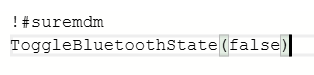
RunScript 2: Toggle Bluetooth State Immediately
!#suremdm
ToggleBluetoothState(false)
Parameter Explanation:
- false → User is not allowed to enable Bluetooth from Settings
- true → User can enable/disable Bluetooth manually
Expected Results
- Bluetooth state is controlled based on the script applied
- Administrators can either enforce restrictions or toggle Bluetooth instantly
- End-user access to Bluetooth settings is restricted when configured
Advantages
- Enhances device security by preventing unauthorized Bluetooth usage
- Enables quick enable/disable without user interaction
Conclusion
The RunScript feature in SureMDM offers a flexible way to manage Bluetooth behavior on Wear OS devices. Administrators can enforce restrictions or dynamically control Bluetooth state, improving both security and operational efficiency.
Need more help? Here’s how to get help from our experts.