
Purpose
This article explains how to mark customers as Favorites and view the list of Favorite Customers in the SureMDM Hub console. The Favorites feature enables administrators to quickly access frequently managed customer accounts without searching through the complete customer list, improving navigation efficiency, reducing the time spent locating customers, and streamlining day-to-day administrative tasks.
Prerequisites
- Valid SureMDM Hub account with appropriate access permissions.
- Ability to sign in to the SureMDM Hub console.
Steps
- Log in to the SureMDM Hub console.
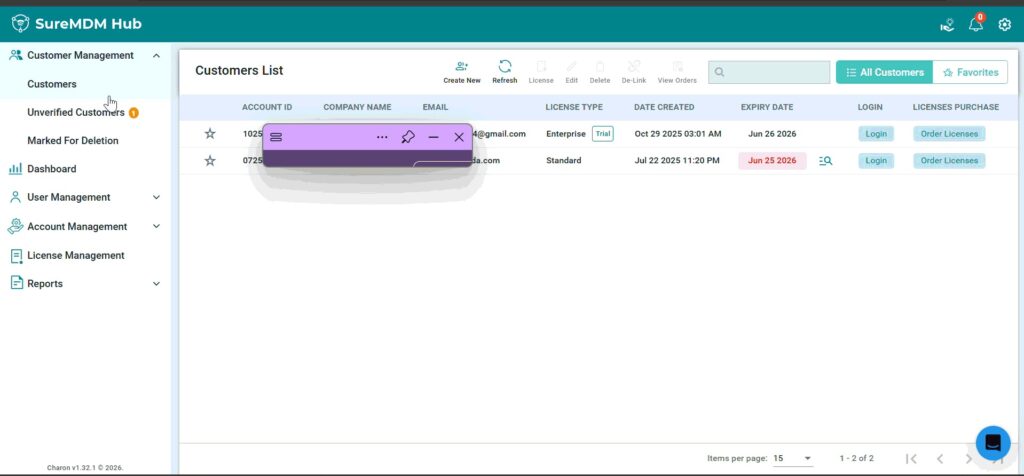
- From the left navigation pane, click on Customers.
- The Customers page displays the list of all Available Customers.
- Locate the Customer you want to mark as a Favorite.
- Click the Star Icon displayed on the left side of the customer name.
- The star icon will be highlighted, indicating that the customer has been added to your Favorites.
- To view the list of favorite customers, click Favorites located in the top-right corner of the Customers page.
- The page will display only the customers that have been marked as favorites.
Expected Result
The selected customer is successfully added to your favorites list. Clicking Favorites displays only the customers marked as favorites, allowing quick and easy access.
Conclusion
Using the Favorites feature in SureMDM Hub helps streamline customer management by providing instant access to frequently managed customers, improving navigation and operational efficiency.
Need more help? Here’s how to get help from our experts.
CONTACT US