
Purpose
This article explains how to set and manage the default Dialer application remotely using the SureMDM Console, helping organizations streamline device setup and enforce standard application usage.
Prerequisites
- Should have a SureMDM Account.
- The Nix Agent version should be greater than 27.38.00
- Supported for Android OS version 14 and above.
- Works only for devices enrolled in DO and WPCO.
Steps
- Login to the SureMDM console.
- Navigate to Profiles > New Profile > Android > System Settings > Application > Under Set Default Dialer Application, enter the package name of the application that you want to set as default dialer application:
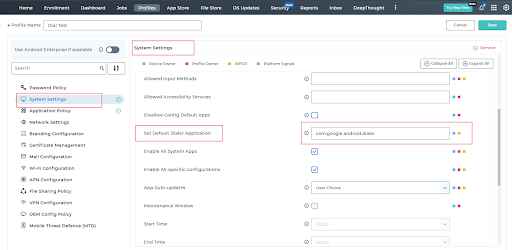
Note: The same setting can be configured if a default profile has been set already.
Click on Save and apply the profile on the device.
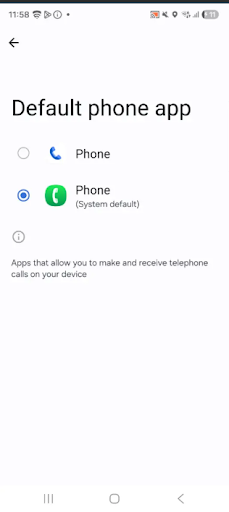
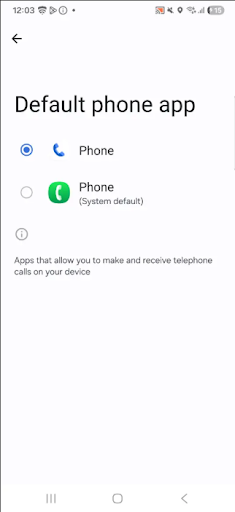
Now, we can see that the default SMS application has been set:
Before configuring the above setting:
After configuring the above settings:
Conclusion: Setting the default Dialer app via SureMDM simplifies management and ensures a consistent calling experience across all Android devices.
Need more help? Here’s how to get help from our experts.
Was this helpful?
YesNo