
Purpose
This article provides step-by-step instructions on how to restrict clipboard (copy/paste) functionality on Zebra Android devices using the SureMDM Zebra MX Config Job. Restricts devices from prompting a copy/paste function on a text field.
Prerequisites:
- Zebra Android Devices with MX 4.2 and above
Steps:
- Log in to the SureMDM Console.
- Navigate to the Jobs section and click on New Job.
- Select the OS as Android and select Zebra MX Config.
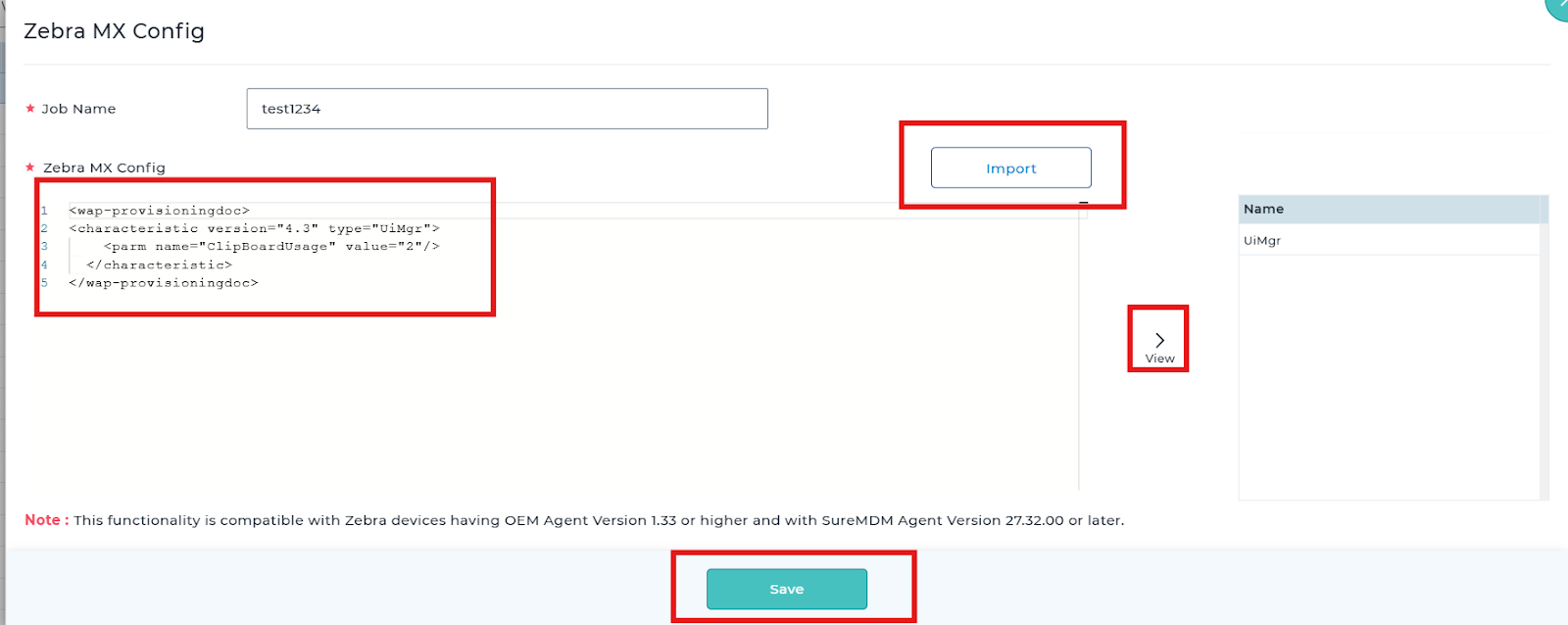
- In the section, insert the XML available below, as shown below.
<wap-provisioningdoc>
<characteristic version=”4.3″ type=”UiMgr”>
<parm name=”ClipBoardUsage” value=”2″ />
</characteristic>
</wap-provisioningdoc>
- Save and deploy it on the device.
Conclusion:
By deploying the Zebra MX Config Job through SureMDM, administrators can effectively restrict clipboard (copy/paste) functionality on Zebra Android devices. This ensures enhanced data security, prevents unauthorized data sharing, and enforces controlled user interactions on managed devices in accordance with organizational policies.
Need more help? Here’s how to get help from our experts.