
Purpose
This report allows the administrator to understand how to track and analyze user session activity (login and logout) across multiple platforms, and how system events like reboot and shutdown are captured for enhanced visibility and auditing.
Prerequisites
The report only supports (Windows, Linux , macOS)
Steps
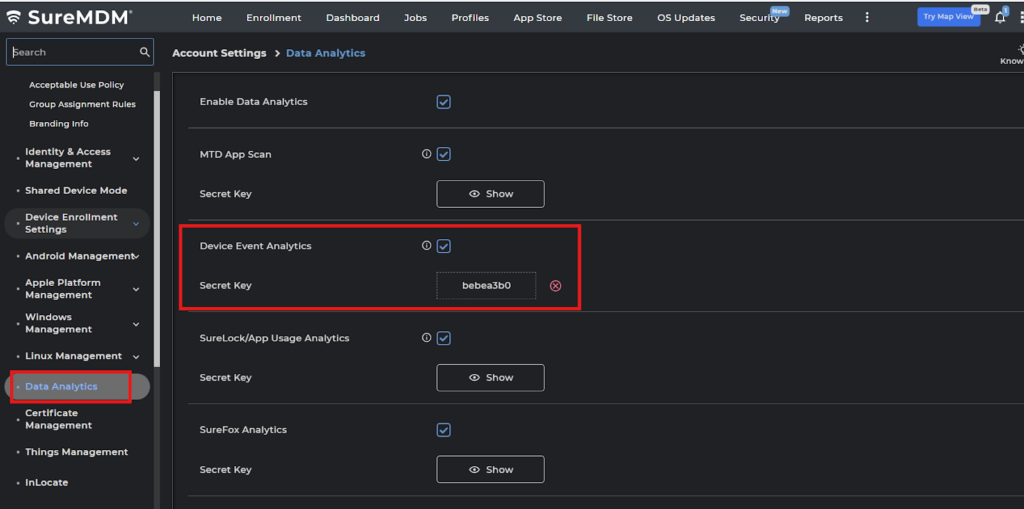
1. Navigate to Account settings and select Data Analytics and enable Device Event Analytics and copy the Secret Key
2. Navigate to Jobs ->New Jobs-> select the platform (Windows and macOS) and configure the Data Analytics Policy
3: Select the Device Event Analytics and Enable Data analytics then paste the Secret key and save the job and deploy it to the device.
3: Navigate to Reports -> On-demand Reports and select Device Event Analytics Reports and Request Report the retrieved report will be in View Reports.
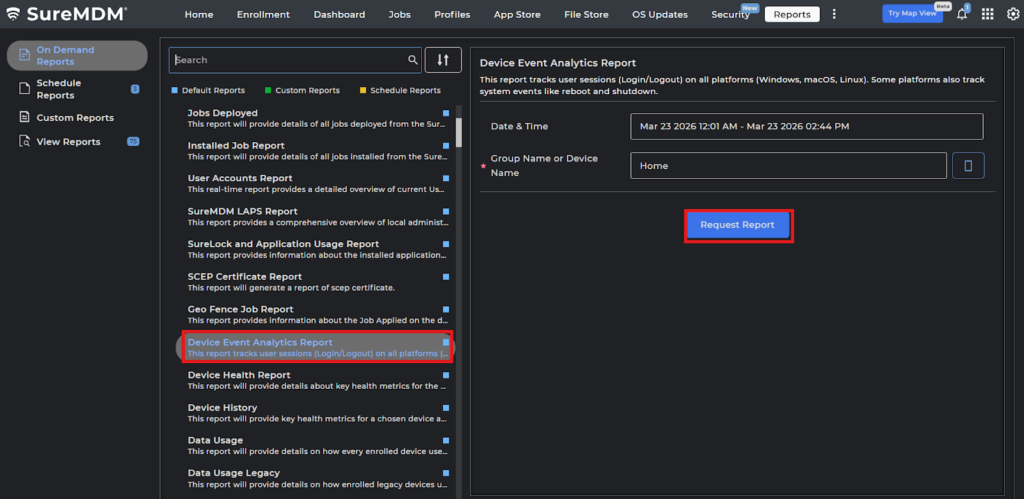
Note: The Data in the report is expected to display after 24 hours from the Job deployment time, as per step 3.
Conclusion:
Device Event Analytics Report centralizes user session and system event data across platforms, allowing organizations to monitor device activity, support troubleshooting, and strengthen operational and security oversight.
Need more help? Here’s how to get help from our experts.