
Purpose
This article explains how to retrieve the count of files within a specified folder using a script and display the count as a custom property in the SureMDM console. Using this approach allows administrators to monitor file counts remotely without requiring manual access to the device.
Prerequisites
- Administrator access to the SureMDM Console
- The target device must be enrolled in SureMDM and actively online
- The target folder path must exist on the device.
- Device must be online and connected periodically to sync the custom property
Steps
- Log in to the SureMDM console
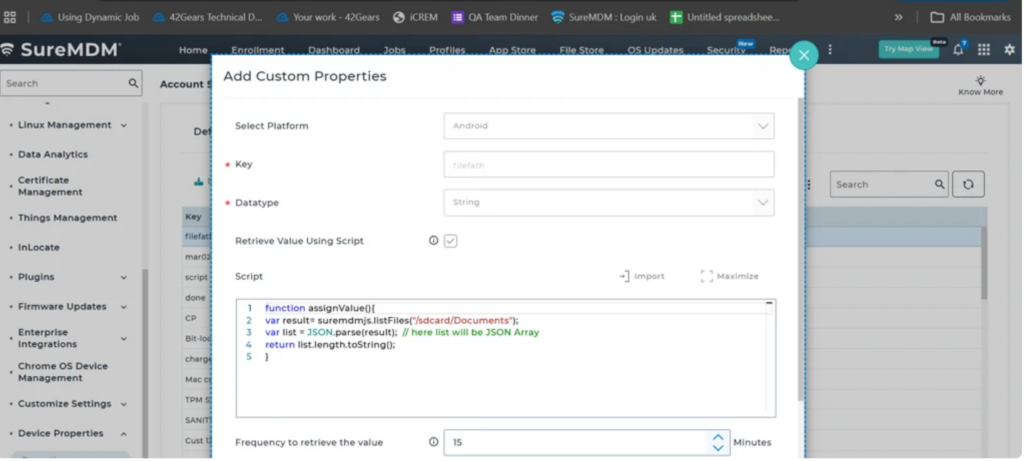
- Create a custom device property in account settings with the below script
function assignValue(){
var result= suremdmjs.listFiles("/sdcard/Documents");
var list = JSON.parse(result);  // here list will be JSON Array
 return list.length.toString();
}
- Assign the created property to a subgroup
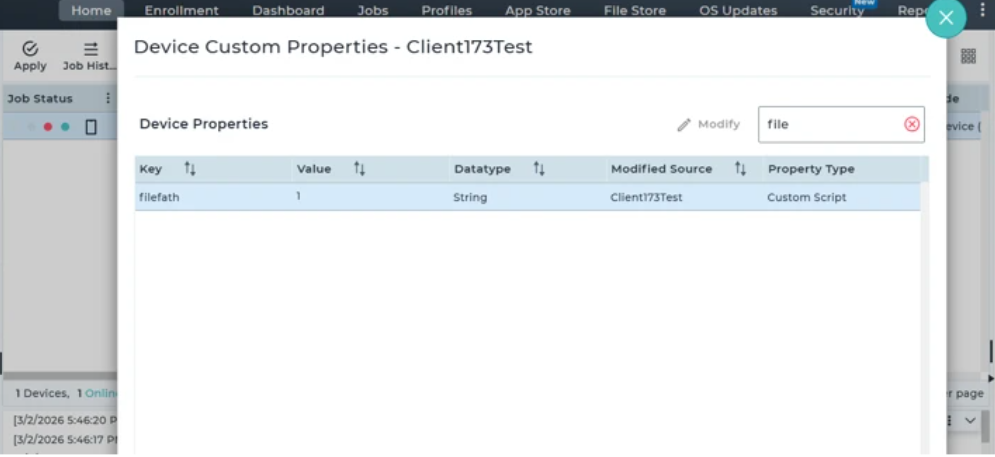
- Once the device property is synced
- Verify the value in the device properties of the devices present in the group
Conclusion
By configuring a custom property with the appropriate script, administrators can efficiently retrieve and monitor the number of files within a specified folder directly from the SureMDM console. This method eliminates the need for manual device access, improves visibility across managed devices, and enables quicker decision-making based on real-time file data.
Need more help? Here’s how to get help from our experts.
Was this helpful?
YesNo