
Purpose
This feature allows the administrator to set and control the device system date, time, and time zone on Lenovo devices using an OEM Config policy.
Prerequisites
N/A
Steps
1. Navigate to Profiles and select New Profile.
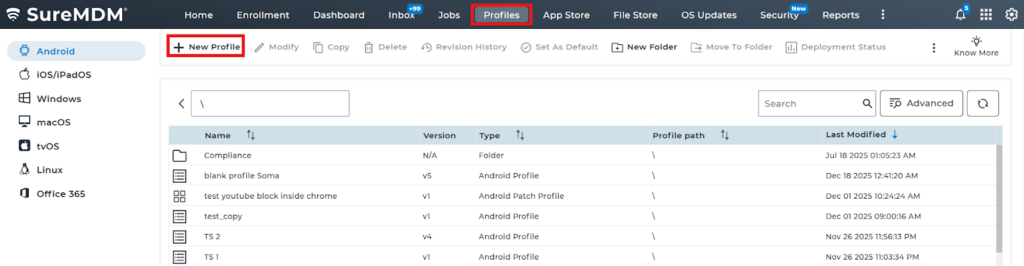
2. Navigate to OEM Config policy -> And select Lenovo OEMConfig (Lenovo OEM)
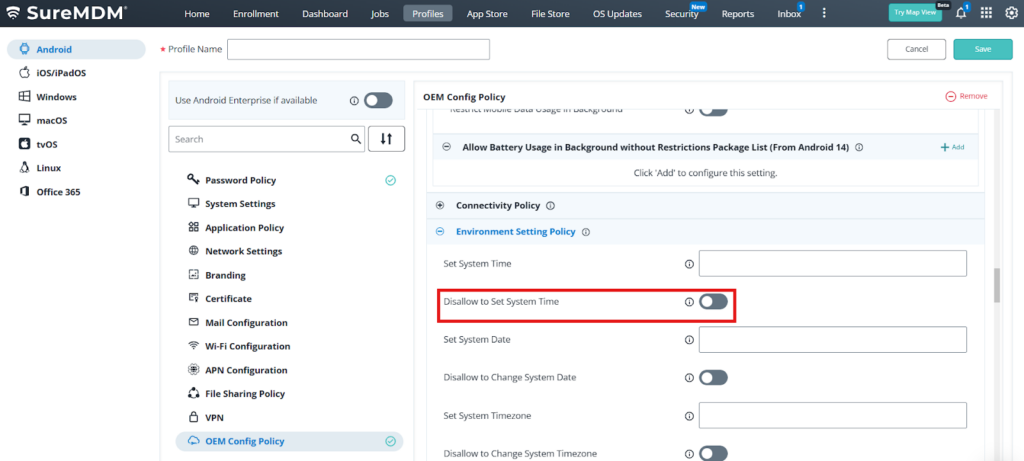
3. Select Environment setting policy and set System Time
4. Also you can disable the user from changing the time by enabling Disallow to Set System Time
Conclusion
Using the Lenovo OEM Config policy in SureMDM, administrators can centrally manage and enforce system date, time, and time zone settings on Lenovo devices, ensuring consistent time configuration and improved compliance across the device fleet.
Need more help? Here’s how to get help from our experts.
Was this helpful?
YesNo