
Purpose:
Accurate location tracking is essential for effective device monitoring and geofencing in enterprise mobility management. However, manually granting high-accuracy location permissions on each device can be time-consuming and require end-user involvement.
To simplify this process, SureMDM provides a RunScript command that allows administrators to Silently Grant High-Accuracy Location Permissions to the SureMDM Agent without user interaction. This ensures precise location tracking and geofencing functionality while improving operational efficiency across managed devices.
Prerequisites:
- The device must have KNOX privileges, be an Enterprise Agent (EA), or have Accessibility Permissions granted to the SureMDM Agent.
- Access to the SureMDM Console with permissions to create and deploy RunScript jobs.
- The device must be Enrolled and online in SureMDM.
Steps:
- Log in to the SureMDM Console.
- Navigate to Jobs -> New Job -> Android -> Run Script
- Enter the Job Name and Enter the below Script
“GrantLocationToHighAccuracySilently()”
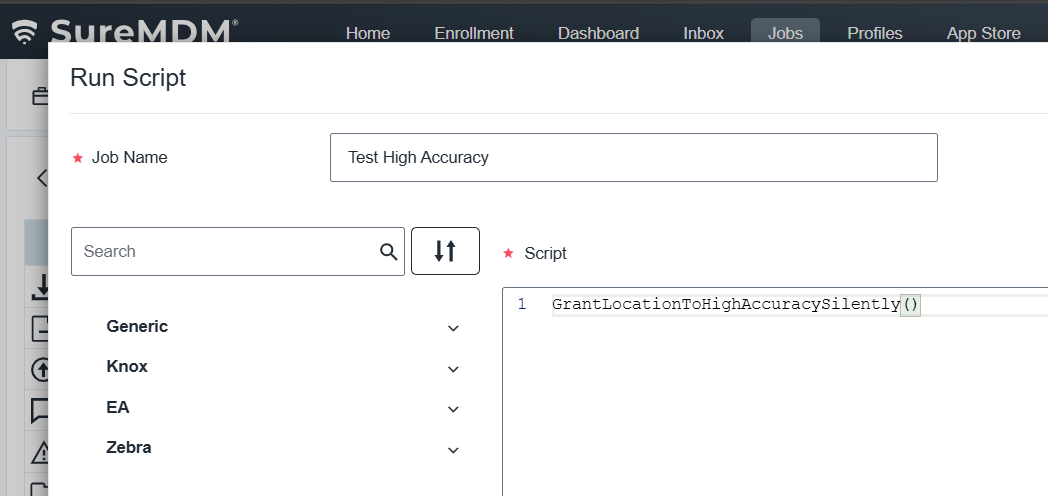
- Click on Save to create the job.
Expected Results:
After successful job execution, the SureMDM Agent will automatically be granted High-Accuracy Location Permissions without any user prompts. This ensures that location tracking and geofencing features in SureMDM function with maximum precision and reliability.
Conclusion:
Using the High-Accuracy Location Permission RunScript, administrators can silently configure precise location settings on managed devices. Automating this process eliminates the need for manual interaction, helping IT teams maintain accurate location tracking and geofence monitoring effortlessly.
Need help?
CONTACT US