
Purpose
This article explains how to use and modify alert templates in the SureMDM console. Alert templates allow administrators to customize notification messages for events such as battery alerts, connection alerts, and other device-related triggers.
Prerequisites
- Access to the SureMDM web console.
- Administrator privileges to access Customize Settings.
Steps
- Log in to the SureMDM Web Console.
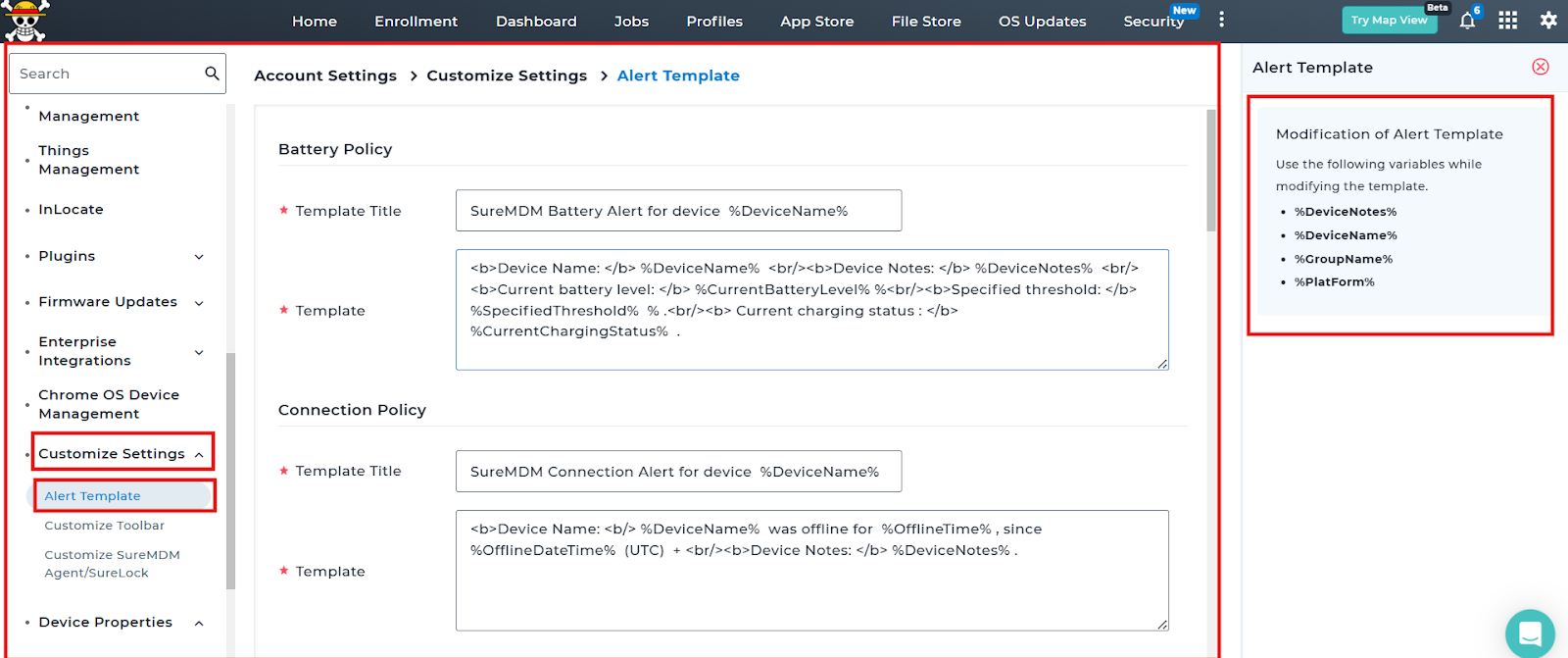
- Navigate to Account Settings > Customize Settings > Alert Template.
- Under the required policy section, locate the Template Title and Template fields.
- Modify the Template Title if required.
- Edit the Template content as per your requirement.
- You can use the following variables while modifying the template:
- %DeviceName%
- %DeviceNotes%
- %GroupName%
- %PlatForm%
Additional variables may be available depending on the selected policy, such as battery level or offline time
- After making the required changes, click Done.
Notes:
- Ensure variables are entered exactly as defined (including % symbols).
- Incorrect variable formatting may result in missing information in alerts.
- Test the alert configuration after modification to confirm proper notification formatting.
Conclusion
By customizing alert templates in the SureMDM console, administrators can create clear and informative notifications tailored to organizational needs. Properly configured alert templates improve monitoring efficiency and response time for device-related events.
Need more help? Here’s how to get help from our experts.
Was this helpful?
YesNo