
Purpose
Administrators may need to monitor security risks, system updates, certificate validity, agent versions, and other important system activities within SureMDM. The Notifications option in the SureMDM Console provides categorized alerts that help administrators stay informed about critical events, updates, and required actions.
Prerequisites
- Access to the SureMDM Console.
- Administrator or appropriate console privileges to view notifications.
Steps
- Log in to the SureMDM Console.
- Navigate to the Notifications section.
- View the available notification categories from the left panel.
- Click on a category to view the related notifications.
Notification Categories
1. Security Alerts
Security Alerts highlight critical security-related issues that may impact your device environment. These notifications may include vulnerability disclosures, compliance risks, policy violations, or configuration issues that require immediate administrator attention. Prompt action on these alerts helps maintain device security and regulatory compliance.
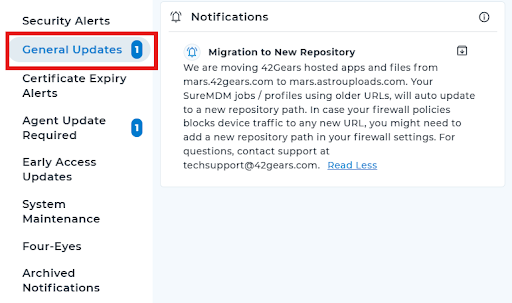
2. General Updates
General Updates provide information about product enhancements, feature improvements, bug fixes, patches, and version releases. These notifications help administrators stay informed about platform changes and ensure they are using the latest and most stable version of SureMDM.
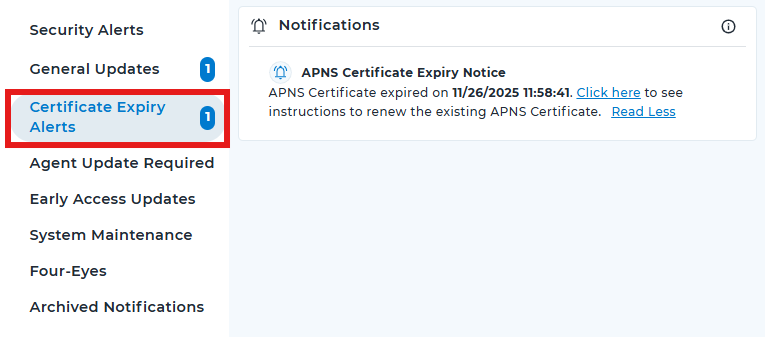
3. Certificate Expiry Alerts
Certificate Expiry Alerts notify administrators about certificates that are nearing expiration or have already expired. This may include APNS, SSL, or other service-related certificates. Timely renewal ensures uninterrupted device communication and prevents service disruptions.
4. Agent Update Required
Agent Update Required notifications indicate that one or more managed devices are running outdated or unsupported SureMDM agent versions. Updating the agent ensures compatibility with the latest features, security patches, and performance improvements.
5. Early Access Updates
Early Access Updates inform administrators about beta or preview features that are available for testing before general release. These notifications allow organizations to evaluate new functionalities and provide feedback before full deployment.
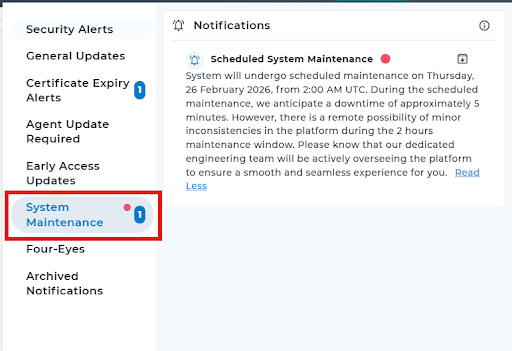
6. System Maintenance
System Maintenance notifications provide information about scheduled maintenance activities, infrastructure updates, or backend improvements. These alerts help administrators plan accordingly if there is any expected downtime or temporary service impact.
7. Four-Eyes
Four-Eyes notifications relate to approval-based actions that require dual authorization. When a configuration change or critical operation is initiated, an approval request is generated, and administrators are notified to review and approve or reject the action.
8. Archived Notifications
Archived Notifications store previously generated alerts for reference. This section helps administrators review past notifications for auditing, tracking historical issues, or verifying previously completed actions.
Expected Results
Administrators can easily monitor and manage different types of notifications through categorized sections, ensuring timely action on security issues, updates, expirations, and maintenance events.
Conclusion
The Notifications section in the SureMDM Console centralizes all important alerts into structured categories. This helps administrators proactively manage security, compliance, updates, and operational activities within their SureMDM environment.
Need more help? Here’s how to get help from our experts.