
Purpose
This article explains how administrators can view the deployment status of a job in SureMDM, including the total number of devices the job is deployed to, status-wise distribution (Pending, In Progress, Failed, Success, Revoke), detailed device information, and graphical representation—all on a single page.
Prerequisites
- Administrator access to the SureMDM Console
- At least one job already created and deployed to devices
- Devices enrolled and visible in the SureMDM console
Steps
- Log in to the SureMDM Console and Navigate to Jobs
- Select the required job (for example, CLEAR STATIC JOB).
- Click on Deployment Status.
The Job Deployment Status page opens, displaying complete deployment details for the selected job.
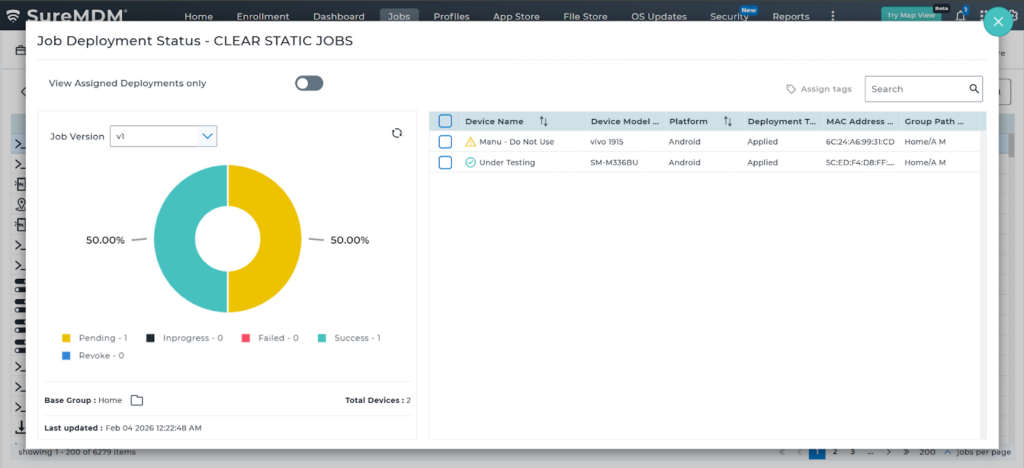
Job Deployment Status Details
On the Deployment Status page, administrators can view the following information:
- Total number of devices the job is deployed to and with the Device Details
Graphical Representation
- A graphical (donut chart) view showing the distribution of devices across all deployment statuses: Pending, In Progress, Failed, Success, Revoke
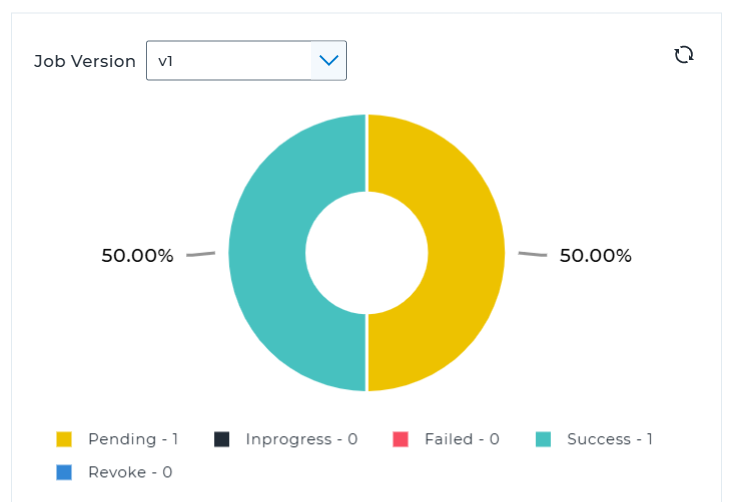
This helps administrators quickly understand the deployment health of the job.
Additional Options
- Select Job Version to view deployment status for a specific version of the job.
- Use Search to locate a specific device.
- Enable View Assigned Deployments Only to filter assigned devices.
- Change the Base Group(Home will be Default).
- Last Updated
Expected Results
- Administrators can view how many devices the job has been deployed to.
- Deployment status (Pending, In Progress, Failed, Success, Revoke) is clearly visible.
- A graphical chart provides a quick visual summary of job deployment.
- Detailed device-level deployment information is available on the same page.
Conclusion
The Deployment Status page in SureMDM provides a centralized view of job deployment progress by combining status summary, graphical representation, and detailed device information. This helps administrators monitor deployments efficiently and quickly identify devices that require attention.
Need more help? Here’s how to get help from our experts.