
Purpose
This article explains how to view the Lost Mode Recovery Status of an Android device from the Device Grid in the SureMDM console. This feature enables administrators to quickly verify whether Lost Mode Recovery is enabled or disabled on a managed Android device without navigating to the device’s detailed information, improving monitoring and administrative efficiency.
Prerequisites
- Access to sign in to the SureMDM console
- The target Android device must be enrolled and visible in the Device Grid.
Steps
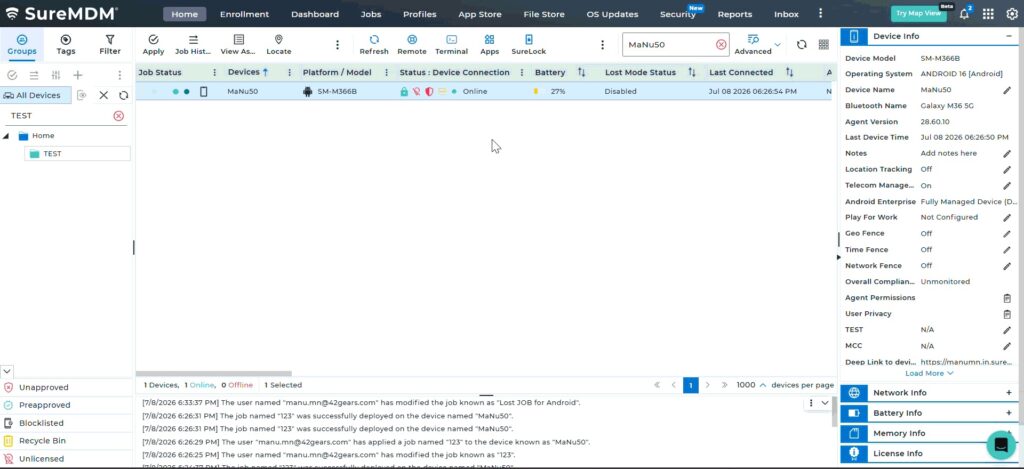
- On the SureMDM console Device Grid -> Click on the required Android device from the list of enrolled devices.
- Identify the Lost Mode Recovery Status column for the device.
- View the status displayed in the column.
- The displayed status indicates whether Lost Mode Recovery is Enabled or Disabled on the device.
Expected Result
The administrator can successfully view the Lost Mode Recovery Status of the selected Android device from the Device Grid and determine whether the feature is enabled or disabled.
Conclusion
Viewing the Lost Mode Recovery Status from the Device Grid allows administrators to quickly monitor the Lost Mode Recovery state of Android devices, enabling efficient device management and simplifying troubleshooting.
Need more help? Here’s how to get help from our experts.
CONTACT US